
Account Contact
Je winkelwagen
Verzending via DPD & FedEx
Hulp nodig? Vraag het de AI

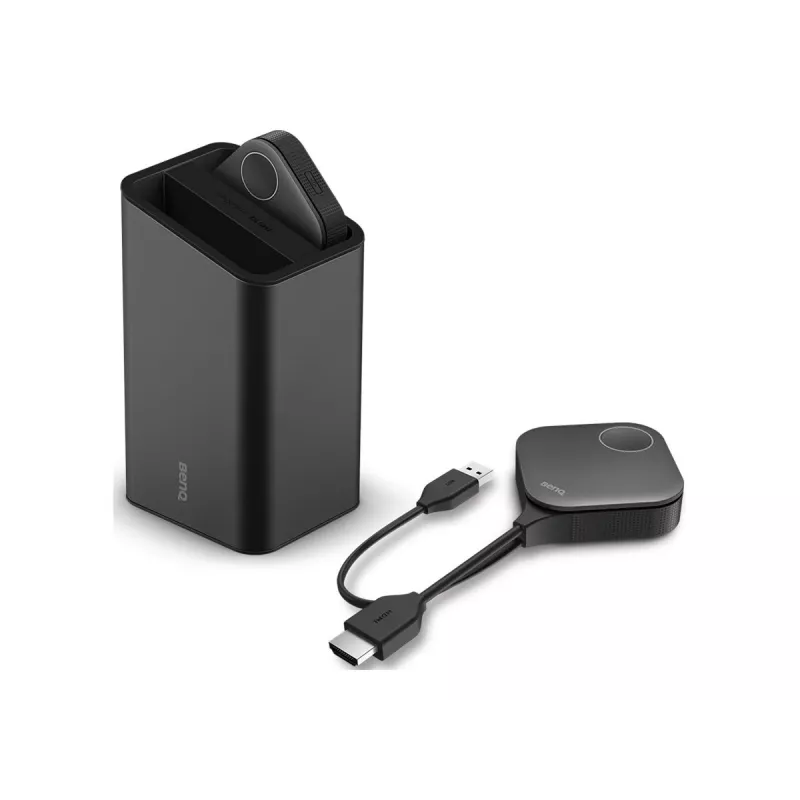
BenQ 5J.JNY28.E30 accessoire voor draadloos presentatiesysteem toetsenkit zwart

BenQ 5J.JNY28.E30 accessoire voor draadloos presentatiesysteem toetsenkit zwart
595,51 €
The BenQ 5J.JNY28.E30 black button kit is an accessory designed for wireless presentation systems to provide tactile control during meetings and lectures. Its compact form and black finish integrate with BenQ devices and conference-room setups, offering simple, physical input for navigation and pres... Lees meer
Voorraad Niet op voorraadGeen voorraad Code 2401941 Merk BENQ Model 5J.JNY28.E30 Garantie 2 jaar

Bezorging & retourneren

The BenQ 5J.JNY28.E30 black button kit is an accessory designed for wireless presentation systems to provide tactile control during meetings and lectures. Its compact form and black finish integrate with BenQ devices and conference-room setups, offering simple, physical input for navigation and presentation control while reducing reliance on on-screen menus or touchpads.

Advantages

The button kit offers direct, physical control that complements wireless presentation hardware, providing reliable input without needing to access menus on-screen. Its compact black design is intended to match typical conference equipment and cabling layouts, enabling unobtrusive placement. The accessory aims for ease of use and quick responsiveness during slide navigation and presentation commands.

Suitable for

  • Conference rooms and meeting spaces
  • Classrooms and lecture halls
  • Corporate presentations and training sessions
  • Hybrid meetings where quick local control is required

Key specifications

  • Product colour: Black
  • Form factor: Button kit for external control
  • Compatibility: Designed for BenQ wireless presentation systems
  • Primary function: Physical navigation and presentation control
  • Mounting/placement: Compact design suitable for desktop or lectern placement

How to use

Place the button kit within easy reach on a lectern or table near the presenter and connect it according to the instructions provided with the main BenQ wireless presentation system. Use the physical buttons to navigate slides, start or stop presentations, and trigger other presentation functions supported by the connected BenQ device. Ensure the accessory is paired or linked to the host unit and that any required drivers or firmware updates for the main wireless presentation system are applied.

Recommendations

For optimal performance, position the button kit so that it is accessible but not in the direct path of foot traffic; verify compatibility with your specific BenQ presentation model and keep the host device firmware up to date to ensure full functionality of physical controls.

Belangrijkste kenmerken
  • Conference rooms and meeting spaces
  • Classrooms and lecture halls
  • Corporate presentations and training sessions
  • Hybrid meetings where quick local control is required
  • Product colour: Black
  • Form factor: Button kit for external control
  • Compatibility: Designed for BenQ wireless presentation systems
  • Primary function: Physical navigation and presentation control
  • Mounting/placement: Compact design suitable for desktop or lectern placement
Specificaties
Compatibiliteit
WDC30
Merkcompatibiliteit
Benq
Productkleur
Black
Producttype
Button kit
Prijsverloop is nog niet beschikbaar
We zijn nog bezig met het verzamelen van voldoende dagelijkse prijsgegevens voor dit product.
Verkoper: UAB KUR LT · Laisvės pr. 125A, LT-06118 Vilnius, Litouwen · Bedrijfsnummer 303192950 · Btw-nummer LT100008198612 · Verzending vanuit de EU (Litouwen)
Hoi, ik ben de AI-assistent van DistriNode. Ik help je graag met het vinden van producten, het vergelijken van opties, het maken van offerte-PDF's of het openen van supportaanvragen.