
Account Contact
Je winkelwagen
Verzending via DPD & FedEx
Hulp nodig? Vraag het de AI

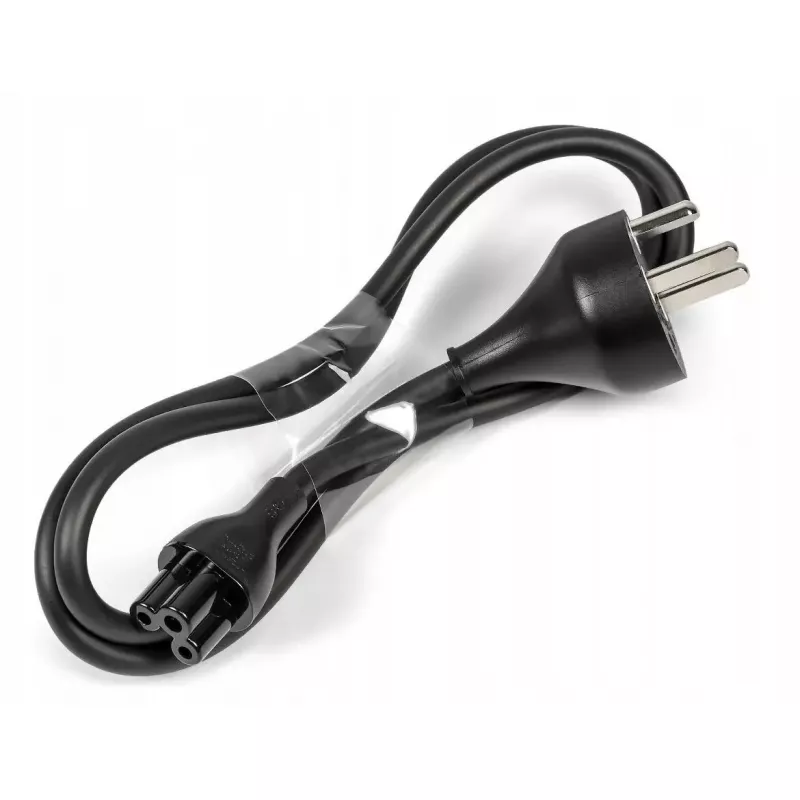
Netsnoer Dell H717C 1 m, 250 V, 2,5 A

Netsnoer Dell H717C 1 m, 250 V, 2,5 A
18,14 €
Dell H717C power cord, 1 m long, rated for 250 V and 2.5 A, provides a straightforward mains connection for compatible Dell desktop PCs, monitors and peripherals. The cable uses a common connector type and a compact length that simplifies cable routing and replacement of worn or lost power leads. Th... Lees meer
Voorraad Niet op voorraadGeen voorraad Code 2573808 Merk DELL Model H717C Garantie 2 jaar

Bezorging & retourneren

Dell H717C power cord, 1 m long, rated for 250 V and 2.5 A, provides a straightforward mains connection for compatible Dell desktop PCs, monitors and peripherals. The cable uses a common connector type and a compact length that simplifies cable routing and replacement of worn or lost power leads. The cord is intended for devices that accept the specified voltage and current and is suitable for typical home and office power outlets.

Advantages

The power cord offers a reliable, standardized connection with defined electrical ratings (250 V, 2.5 A) to match compatible equipment. Its 1 meter length balances reach and neat cable management, reducing excess slack behind desks or entertainment units. The cable construction and connector geometry follow common industry practices, enabling easy replacement and interchangeability with many systems that accept the same plug format.

Suitable for

  • Desktop PCs and small form-factor workstations that accept a standard IEC-style power lead and operate within 250 V / 2.5 A limits
  • Computer monitors and business displays compatible with the same connector and electrical rating
  • Peripherals and office equipment (network devices, external drives, docking stations) within the specified voltage and current range

Key specifications

  • Length: 1 meter
  • Voltage rating: 250 V
  • Current rating: 2.5 A
  • Connector type: standard IEC-style mains connector compatible with many Dell power inlets
  • Application: mains power connection for desktop PCs, monitors and similar peripherals

How to use

Verify that the target device accepts a power lead with the listed electrical ratings and connector type before connecting. With the mains outlet switched off, insert the cord’s connector into the device power inlet and then plug the other end into the appropriate wall socket. Ensure the cable is routed to avoid tripping hazards and is not tightly bent near the connector. Switch on the mains outlet or power strip and then the device. For removal, switch off power first and pull the connector straight out without twisting.

Recommendations

Use the cord only with devices rated for 250 V and up to 2.5 A. Do not use if the cable or connectors show visible damage. Avoid running the cable under heavy furniture or across doorways; if permanent or outdoor installation is required, choose a cable rated for that environment. Replace the cord immediately if insulation is cut, exposed wires appear, or connectors become loose.

Belangrijkste kenmerken
  • Desktop PCs and small form-factor workstations that accept a standard IEC-style power lead and operate within 250 V / 2.5 A limits
  • Computer monitors and business displays compatible with the same connector and electrical rating
  • Peripherals and office equipment (network devices, external drives, docking stations) within the specified voltage and current range
  • Length: 1 meter
  • Voltage rating: 250 V
  • Current rating: 2.5 A
  • Connector type: standard IEC-style mains connector compatible with many Dell power inlets
  • Application: mains power connection for desktop PCs, monitors and similar peripherals
Prijsverloop is nog niet beschikbaar
We zijn nog bezig met het verzamelen van voldoende dagelijkse prijsgegevens voor dit product.

Populaire producten in deze categorie

Hoi, ik ben de AI-assistent van DistriNode. Ik help je graag met het vinden van producten, het vergelijken van opties, het maken van offerte-PDF's of het openen van supportaanvragen.