
Account Contact
Je winkelwagen
Verzending via DPD & FedEx
Hulp nodig? Vraag het de AI

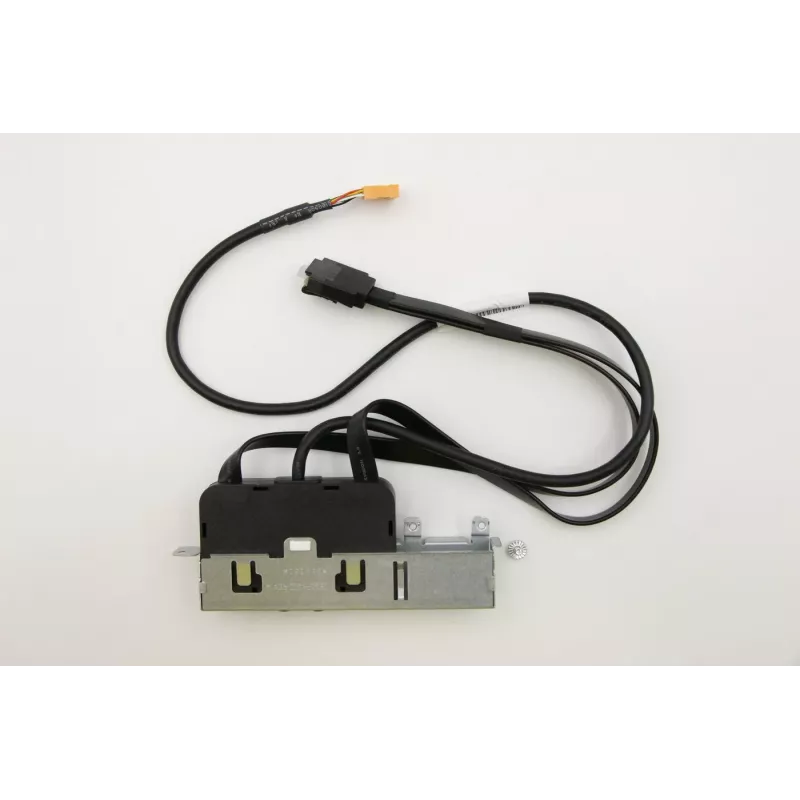
USB-houder voor Lenovo desktop (MECH_ASM Murray 20L, model 00KT168)

USB-houder voor Lenovo desktop (MECH_ASM Murray 20L, model 00KT168)
79,94 €
Replacement USB bracket designed for Lenovo MECH_ASM Murray 20L desktops, model 00KT168. This component restores external USB connectivity on compatible Lenovo systems, providing a factory-fit interface for connecting peripherals. The bracket is intended for repair or upgrade of the computer’s front... Lees meer
Voorraad Niet op voorraadGeen voorraad Code 1529284 Merk LENOVO Model 00KT168 Garantie 2 jaar

Bezorging & retourneren

Replacement USB bracket designed for Lenovo MECH_ASM Murray 20L desktops, model 00KT168. This component restores external USB connectivity on compatible Lenovo systems, providing a factory-fit interface for connecting peripherals. The bracket is intended for repair or upgrade of the computer’s front or rear I/O assembly and preserves OEM alignment and mounting points for a clean installation.

Advantages

The USB bracket offers direct compatibility with the specified Lenovo chassis and maintains original mounting alignment to ensure easy installation without chassis modification. It restores lost or damaged USB ports to full functionality and supports standard USB connector types used in the system. The part is compact, preserves the original aesthetic of the desktop, and allows peripheral devices to be connected reliably for data transfer and power delivery.

Suitable for

  • Repairing or replacing damaged front/back USB ports on compatible Lenovo desktops
  • Restoring connectivity for keyboards, mice and external storage devices
  • Upgrading a system during maintenance to regain OEM-style I/O alignment
  • Service centers and technicians performing desktop hardware repairs

Key specifications

  • Form factor: dedicated desktop I/O bracket sized for Lenovo Murray 20L chassis
  • Interface: external USB connector arrangement compatible with system internal header/cabling
  • Material: rigid plastic and metal mounting points for chassis attachment
  • Color and finish: OEM-matching finish to preserve original appearance
  • Mounting: standard screw and clip locations matching the desktop housing

How to use

Power down the desktop and disconnect all cables before beginning. Open the chassis according to the manufacturer’s service instructions, remove the failed or damaged USB bracket, and disconnect any internal cables. Align the replacement USB bracket with the mounting points, secure it with the original screws or clips, and reconnect the internal cable to the system header. Close the chassis, reconnect external cables, and power on the computer to verify that all USB ports are recognized and functioning.

Recommendations

Ensure electrostatic discharge (ESD) precautions are taken during installation. Verify compatibility with the Lenovo Murray 20L chassis and follow Lenovo service guidelines for disassembly and reassembly to avoid damage to connectors and surrounding components.

Belangrijkste kenmerken
  • Repairing or replacing damaged front/back USB ports on compatible Lenovo desktops
  • Restoring connectivity for keyboards, mice and external storage devices
  • Upgrading a system during maintenance to regain OEM-style I/O alignment
  • Service centers and technicians performing desktop hardware repairs
  • Form factor: dedicated desktop I/O bracket sized for Lenovo Murray 20L chassis
  • Interface: external USB connector arrangement compatible with system internal header/cabling
  • Material: rigid plastic and metal mounting points for chassis attachment
  • Color and finish: OEM-matching finish to preserve original appearance
  • Mounting: standard screw and clip locations matching the desktop housing
Prijsverloop is nog niet beschikbaar
We zijn nog bezig met het verzamelen van voldoende dagelijkse prijsgegevens voor dit product.

Populaire producten in deze categorie

Hoi, ik ben de AI-assistent van DistriNode. Ik help je graag met het vinden van producten, het vergelijken van opties, het maken van offerte-PDF's of het openen van supportaanvragen.