
Account Contact
Je winkelwagen
Verzending via DPD & FedEx
Hulp nodig? Vraag het de AI

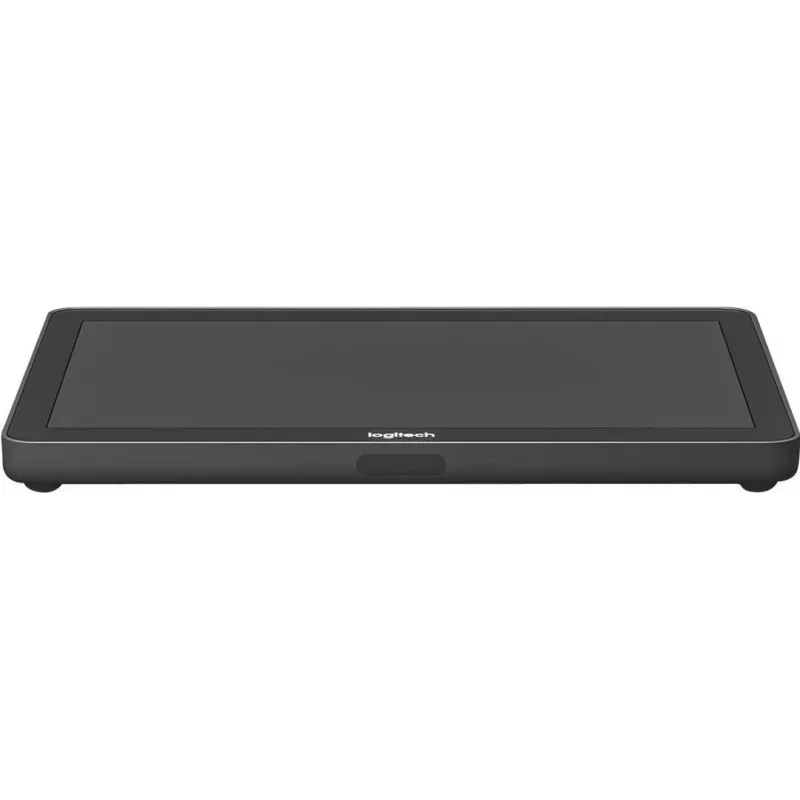
Videoconferentiekit Logitech Tap voor Microsoft Teams — model TAPMSTBASEDEL, touchcontroller voor vergaderruimtes

Videoconferentiekit Logitech Tap voor Microsoft Teams — model TAPMSTBASEDEL, touchcontroller voor vergaderruimtes
2.830,12 €
Logitech Tap for Microsoft Teams (model TAPMSTBASEDEL) is a touch controller designed to serve as a central interface for Teams meetings in huddle spaces and small-to-medium meeting rooms. The controller provides a dedicated, tactile way to start and join scheduled Microsoft Teams calls, control con... Lees meer
Voorraad Niet op voorraadGeen voorraad Code 2342640 Merk LOGITECH Model TAPMSTBASEDEL Garantie 2 jaar

Bezorging & retourneren

Logitech Tap for Microsoft Teams (model TAPMSTBASEDEL) is a touch controller designed to serve as a central interface for Teams meetings in huddle spaces and small-to-medium meeting rooms. The controller provides a dedicated, tactile way to start and join scheduled Microsoft Teams calls, control connected room equipment and manage meeting room settings from a single, wall- or table-mounted touch panel. The Tap unit integrates with Teams Rooms software and common room peripherals to simplify meeting workflows and reduce time spent on setup.

Advantages

The Tap touch controller offers a compact, responsive touch screen and a streamlined user interface tailored for Microsoft Teams, enabling single-touch meeting join and straightforward room control. Its design supports multiple mounting options and neat cable management to keep meeting spaces tidy. Integration with standard Teams Rooms platforms and common conferencing devices ensures consistent behavior across rooms and minimizes administrative overhead.

Suitable for

  • Huddle spaces and small meeting rooms
  • Medium-sized conference rooms requiring a centralized touch controller
  • Organizations using Microsoft Teams as their primary meeting platform
  • Rooms where quick, simple meeting joining and room peripheral control are needed

Key specifications

  • Screen type: capacitive touch panel designed for quick, single-touch operation
  • Compatibility: Microsoft Teams Rooms software integration
  • Mounting options: table mount, wall mount, and optional angled mounts for flexible placement
  • Connectivity: wired connections for power and data to integrate with room systems
  • Controls: on-screen meeting controls and support for managing connected peripherals such as cameras, microphones and speakers
  • Form factor: compact, low-profile touch controller suitable for professional meeting environments

How to use

Install the Tap controller in the preferred location using the appropriate mount and connect it to the Teams Rooms compute unit and room peripherals following the manufacturer's installation guidelines. Once connected, sign in to the Microsoft Teams Rooms environment and register the device to your organization's calendar system. Use the Tap touchscreen to view upcoming meetings, join calls with a single touch, and control in-room devices such as camera presets, microphone mute and speaker volume directly from the interface.

Recommendations

Place the Tap controller within comfortable reach of meeting participants and route cables through provided channels for a clean installation. Keep Teams Rooms software updated and follow network and security policies to ensure reliable connectivity and consistent meeting behavior.

Belangrijkste kenmerken
  • Huddle spaces and small meeting rooms
  • Medium-sized conference rooms requiring a centralized touch controller
  • Organizations using Microsoft Teams as their primary meeting platform
  • Rooms where quick, simple meeting joining and room peripheral control are needed
  • Screen type: capacitive touch panel designed for quick, single-touch operation
  • Compatibility: Microsoft Teams Rooms software integration
  • Mounting options: table mount, wall mount, and optional angled mounts for flexible placement
  • Connectivity: wired connections for power and data to integrate with room systems
  • Controls: on-screen meeting controls and support for managing connected peripherals such as cameras, microphones and speakers
  • Form factor: compact, low-profile touch controller suitable for professional meeting environments
Prijsverloop van de afgelopen 6 maanden
Videoconferentiekit Logitech Tap voor Microsoft Teams — model TAPMSTBASEDEL, touchcontroller voor vergaderruimtes
Actueel
2.830,12 €
Laagste
2.751,14 €
Hoogste
2.891,07 €
Wijziging 24 uur
+63,58 €   +2%
Week
+55,70 €   +2%
Maand
+66,39 €   +2%
Hoi, ik ben de AI-assistent van DistriNode. Ik help je graag met het vinden van producten, het vergelijken van opties, het maken van offerte-PDF's of het openen van supportaanvragen.