
Account Contact
Je winkelwagen
Verzending via DPD & FedEx
Hulp nodig? Vraag het de AI

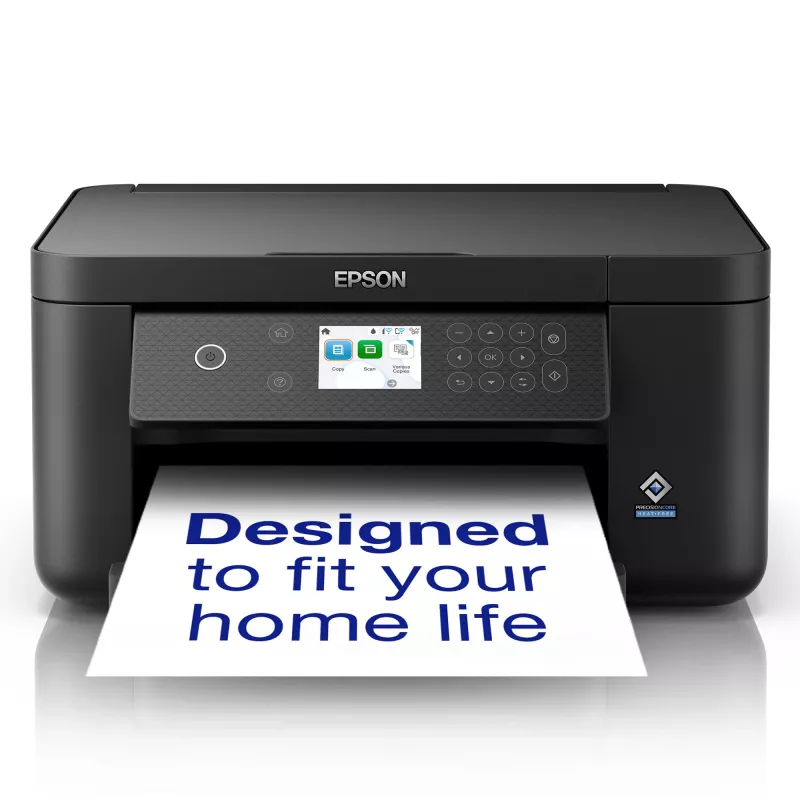
Epson Expression Home XP-5200 inkjet A4 4800 x 1200 dpi Wi-Fi

Epson Expression Home XP-5200 inkjet A4 4800 x 1200 dpi Wi-Fi
133,49 €
SLEEK AND STYLISH 3-in-1The sleek Epson Expression XP-5200 wireless all-in-one offers auto 2-sided printing and other high-performance features for efficient everyday home printing. Featuring a 2.4" colour LCD for simple setup and navigation, the XP-5200 makes it easy to wirelessly print, copy, and ... Lees meer
Voorraad 1 Code 127983 Merk EPSON Model C11CK61403 Garantie 2 jaar

Bezorging & retourneren

Verwachte bezorgdatum donderdag, oktober 22
Je blijft op de hoogte via ons uitgebreide trackingsysteem
Betaalopties
BetaalkaartVisaMastercardPayPalApple PayGoogle PayBankoverschrijving
SLEEK AND STYLISH 3-in-1
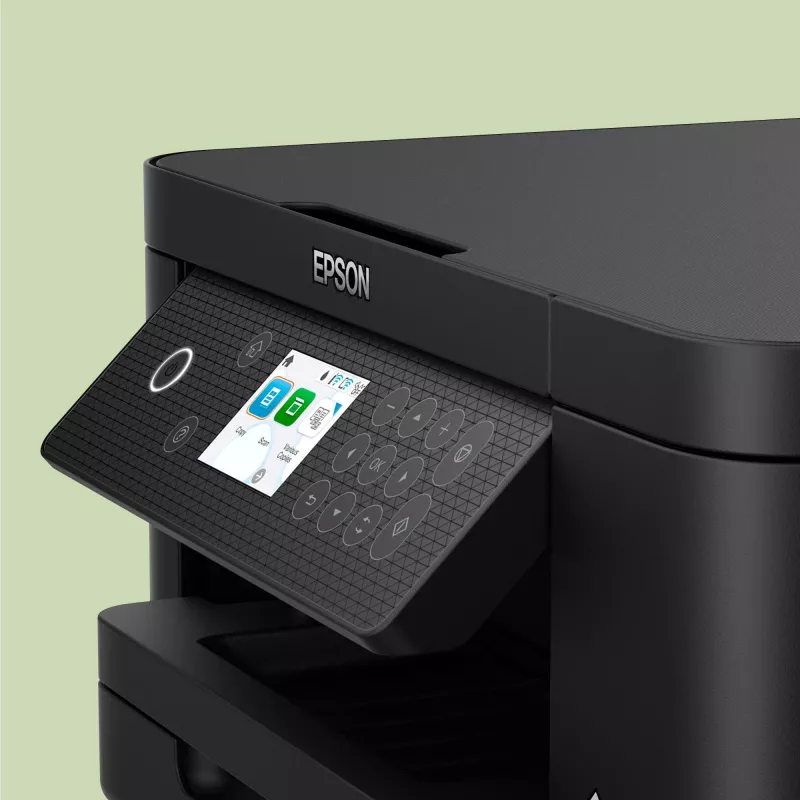
The sleek Epson Expression XP-5200 wireless all-in-one offers auto 2-sided printing and other high-performance features for efficient everyday home printing. Featuring a 2.4" colour LCD for simple setup and navigation, the XP-5200 makes it easy to wirelessly print, copy, and scan documents and photos.

AFFORDABLE INDIVIDUAL INK CARTRIDGES
Depending on what you are printing – lots of blue skies will mean your cyan will need replacing sooner than other colours – your printer's ink will reduce at different levels. With individual inks you only need to replace one cartridge at a time – the one that actually needs replacing. With tri-colour cartridges, you end up throwing away the entire cartridge even if just one colour runs out, meaning you waste the good ink you have left. Wasted ink is just wasted money. Epson individual ink cartridges means you save money and don't waste ink.

EPSON SMART-PANEL
An innovative interface, the Epson Smart Panel app² transforms your iOS® or Android™ mobile device³ into an intuitive control centre for your Epson Expression Home XP-5200. This powerful tool makes it easy to set up, monitor, print, scan and more using your Epson printer, right from your hand-held device. With quick-configuration features, it offers easy product setup on your wireless network and automatically detects your printer. Customise the app to your own preferences and requirements. Built to offer everything you need in one convenient app, Epson Smart Panel allows you to register your product, order supplies and easily access troubleshooting tips.

POWERED BY PRECISIONCORE® HEAT-FREE TECHNOLOGY
The Epson Expression Home XP-5200 is powered by PrecisionCore® Heat-Free Technology which uses a revolutionary high-density print chip that can generate up to 40 million precise dots per second with amazing accuracy, producing professional-quality output at fast speeds.

Simple wired & wireless connectivity
The Epson Expression Home XP-5200 supports the latest wireless standard, 802.11 b/g/n⁴ and includes Wi-Fi Direct®. Which means no router is required, providing users with greater coverage and faster speeds. You can use your printer from anywhere in your home and share it with multiple PCs.

Print from your iPad or iPhone
Apple® AirPrint™ makes it simple to print emails, web pages, presentations and documents straight from their iPad or iPhone. There's no software to download, no drivers to install and no cables to connect. Your Apple® IOS® device will automatically connect to the printer.

How to use

Place the printer on a stable surface and connect it to power. Use the 2.4" colour LCD or the Epson Smart Panel mobile app to complete the wireless setup and add the device to your Wi‑Fi network or connect via Wi‑Fi Direct. Load A4 paper into the input tray, install the individual ink cartridges, and select print, copy or scan from the control panel or your computer or mobile device. For scanning, open the scanner lid, position the document on the glass, then start the scan from the printer or via the app.

Recommendations

Regularly update the Epson Smart Panel app and printer firmware, use genuine Epson individual ink cartridges to maintain print quality, and keep the printer in a dust-free environment. For best photo and document results, select appropriate paper type in print settings and perform occasional nozzle checks and alignments.

Belangrijkste kenmerken
  • Home users who need colour printing, copying and scanning
  • Small home offices requiring duplex printing and wireless connectivity
  • Mobile printing from smartphones and tablets (AirPrint, Epson Smart Panel)
  • Print technology: Inkjet
  • Printing: Colour, max resolution 4800 x 1200 dpi
  • Copying: Colour
  • Scanning: Colour, optical resolution 1200 x 2400 dpi
  • Duplex: Automatic two-sided print
  • Display: 2.4" colour LCD
  • Connectivity: Wi‑Fi (802.11 b/g/n), Wi‑Fi Direct, Apple AirPrint, no Ethernet LAN
  • Paper size: up to A4
  • Weight: 5.4 kg
  • Colour: Black
Specificaties
Aantal printcartridges
4
Aantal USB 2.0-poorten
1
AC-ingangsfrequentie
50 - 60 Hz
AC-ingangsspanning
100 - 240 V
Afdrukkleuren
Black, Cyan, Magenta, Yellow
Beelddiagonaal
6.1 cm (2.4")
Breedte
375 mm
Diepte
347 mm
Direct printen
Yes
Display
TFT
Dubbelzijdig printen
Yes
Duplexfuncties
Print
Enveloppenformaten
C6, DL, 10
Ethernet LAN
No
Faxen
No
Formaten ISO A-serie (A0...A9)
A4, A6, A5
Fotopapierformaten (inch)
3.5x5,5x7,5x8,4x6,8x10
Gewicht
5.4 kg
Grijswaardendiepte invoer
16 bit
Hoogte
187 mm
Ingebouwd display
Yes
ISO B-formaten (B0...B9)
B5
Kabels inbegrepen
AC
Kleurdiepte invoer
48 bit
Kleurdiepte uitvoer
24 bit
Kleurendisplay
Yes
Kopiëren
Colour copying
Marktpositionering
Home & office
Maximaal papierformaat ISO A-serie
A4
Maximale resolutie
4800 x 1200 DPI
Mediatypen papierlade
Photo paper, Plain paper, Envelopes
Modus dubbelzijdig printen
Auto
Niet-ISO-afdrukformaten
Legal, Letter
Ondersteunde Mac-besturingssystemen
Mac OS X 11.0 Big Sur, Mac OS X 12.0 Monterey, Mac OS X 10.7 Lion, Mac OS X 10.8 Mountain Lion, Mac OS X 10.9 Mavericks
Ondersteunde Windows-besturingssystemen
Windows 10, Windows 8, Windows 7, Windows 8.1, Windows 11
Optische scanresolutie
1200 x 2400 DPI
Printen
Colour printing
Printsnelheid (ISO/IEC 24734) kleur
7.5 ppm
Printsnelheid (ISO/IEC 24734) zwart
14 ppm
Printtechnologie
Inkjet
Productkleur
Black
Randloos printen
Yes
Scannen
Colour scanning
Scannertype
Flatbed scanner
Scantechnologie
CIS
Technologieën voor mobiel printen
Apple AirPrint
Totaal aantal invoerladen
1
Totale invoercapaciteit
150 sheets
Totale uitvoercapaciteit
150 sheets
USB-poort
Yes
Wifi
Yes
Wifi-standaarden
802.11b, 802.11g, Wi-Fi 4 (802.11n)

Handleiding

Document openen
Prijsverloop van de afgelopen 6 maanden
Epson Expression Home XP-5200 inkjet A4 4800 x 1200 dpi Wi-Fi
Actueel
133,49 €
Laagste
120,94 €
Hoogste
134,89 €
Wijziging 24 uur
+11,91 €   +10%
Week
+10,88 €   +9%
Maand
+1,11 €   +1%

Onafhankelijke reviews van techmedia

rtings.comSophie
7.3/10

“The Epson Expression Home XP-5200 is a color inkjet all-in-one printer designed for home use and replaces the older Epson Expression Home XP-5100. It has USB and Wi-Fi connectivity, supports Apple AirPrint and Mopria Print Service, and is compatible…”

Pluspunten
  • Produces high-quality documents and scans
  • Good cost per print
  • Produces detailed and colorful photos
  • Wired and wireless connectivity
Minpunten
  • Low page yields
  • Photos look grainy
  • Slow to print color documents
  • Requires a lot of maintenance
Lees de volledige review op rtings.com →
pcmag.com
8/10

Eindoordeel: ...

Pluspunten
  • Compact and lightweight
  • Fast printing
  • Automatic print duplexing (two-sided printing)
Minpunten
  • No ADF
  • Scans at only up to letter size
  • High running cost
Lees de volledige review op pcmag.com →

Populaire producten in deze categorie

Hoi, ik ben de AI-assistent van DistriNode. Ik help je graag met het vinden van producten, het vergelijken van opties, het maken van offerte-PDF's of het openen van supportaanvragen.