
Account Contact
Je winkelwagen
Verzending via DPD & FedEx
Hulp nodig? Vraag het de AI

Grafische tablet Wacom Cintiq 24 Touch 527 x 296 mm 5080 lpi

Grafische tablet Wacom Cintiq 24 Touch 527 x 296 mm 5080 lpi
1.532,58 €
The Wacom Cintiq 24 Touch is a professional graphic tablet with a 23.8" (61 cm) IPS touchscreen and a high-resolution 5080 lpi capability, providing a large active area of 527 x 296 mm for detailed drawing, painting and design work. The device combines precise pen input with 10-finger multi-touch su... Lees meer
Voorraad 1 Code 130897 Merk WACOM Model 100591118 Garantie 2 jaar

Bezorging & retourneren

Verwachte bezorgdatum vrijdag, oktober 23
Je blijft op de hoogte via ons uitgebreide trackingsysteem
Betaalopties
BetaalkaartVisaMastercardPayPalApple PayGoogle PayBankoverschrijving

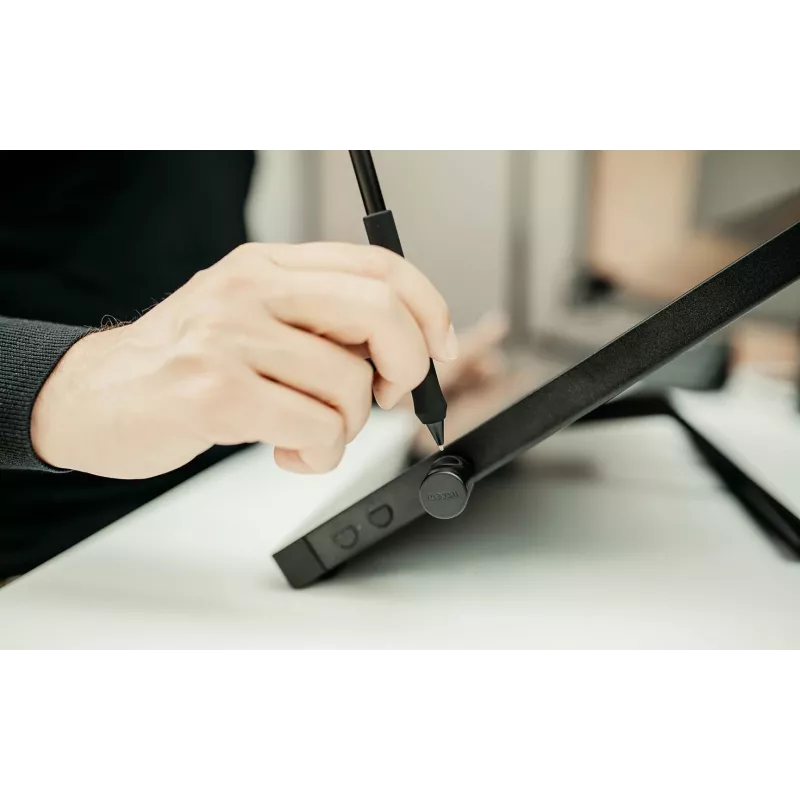
The Wacom Cintiq 24 Touch is a professional graphic tablet with a 23.8" (61 cm) IPS touchscreen and a high-resolution 5080 lpi capability, providing a large active area of 527 x 296 mm for detailed drawing, painting and design work. The device combines precise pen input with 10-finger multi-touch support, USB connectivity and a low-profile black design suitable for home studios and professional workspaces.

Advantages

The Cintiq 24 Touch offers a spacious 2.5K display with accurate pen tracking and responsive multi-touch gestures, plus a stable, fanless design for long sessions. Its integrated adjustable stand (16°–69°) and VESA compatibility deliver ergonomic flexibility and easy mounting options. The tablet includes Wacom Pro Pen 3 and improved cable management for a tidy setup and reliable performance in hybrid 2D/3D pipelines.

Suitable for

  • Concept art and illustration
  • Storyboarding and pre-production
  • Animation, VFX and 3D sculpting workflows
  • Matte painting and compositing

Key specifications

  • Display: 23.8" (61 cm) IPS touchscreen, 16:9
  • Resolution / Pen accuracy: 5080 lpi
  • Working area: 527 x 296 mm
  • Input methods: Pen and 10-finger multi-touch
  • Included pen: Wacom Pro Pen 3 (pen included)
  • Connectivity: Wired USB (USB-C/HDMI/USB-A support for setup; some adapters/cables sold separately)
  • Stand: Integrated adjustable stand, 16°–69°
  • VESA compatibility: 75 x 75 mm
  • Color: Black

How to use

Connect the Cintiq 24 Touch to your computer using the appropriate USB and video cables for your system. Install Wacom drivers provided on Wacom’s website or included media, then configure pen and touch settings in the driver control panel. Use the Wacom Pro Pen 3 to draw directly on the IPS display and employ multi-touch gestures for navigation, zoom and rotation while you work in compatible applications such as Adobe Photoshop, Blender or Maya.

Recommendations

For best performance, keep drivers up to date and use recommended cables/adapters for your platform. Adjust the integrated stand to a comfortable angle between 16° and 69° to reduce wrist and shoulder strain during extended sessions. If integrating into a rig, use the 75 x 75 mm VESA mount to secure the display.
Belangrijkste kenmerken
  • Concept art and illustration
  • Storyboarding and pre-production
  • Animation, VFX and 3D sculpting workflows
  • Matte painting and compositing
  • Display: 23.8" (61 cm) IPS touchscreen, 16:9
  • Resolution / Pen accuracy: 5080 lpi
  • Working area: 527 x 296 mm
  • Input methods: Pen and 10-finger multi-touch
  • Included pen: Wacom Pro Pen 3 (pen included)
  • Connectivity: Wired USB (USB-C/HDMI/USB-A support for setup; some adapters/cables sold separately)
  • Stand: Integrated adjustable stand, 16°–69°
  • VESA compatibility: 75 x 75 mm
  • Color: Black
Specificaties
Aantal HDMI-poorten
1
Aantal kleuren display
16.7 million colours
Aantal USB Type-C-poorten
1
Afmetingen pen L x D
160 x 8.4
Apparaatinterface
USB
Beelddiagonaal
24 "
Beeldschermresolutie
2560 x 1440
Beeldverhouding
16:9
Breedte
568 mm
Contrastverhouding (typisch)
1000:1
Diepte
340 mm
Display
IPS
Draadloze pen
Yes
Gevoed via USB
Yes
Gewicht pen
9.1 g
Gewicht tablet
5000 g
HD-type
Quad HD
Helderheid
350 cd/m²
Hoogte
21 mm
Inhoud verpakking
Wacom Cintiq 24 Touch Wacom Pro Pen 3 Wacom Adjustable Stand Vari-angle Pen Stand (incl. 1 pc Standard Nib, 1 pc Felt Nib) and Nib Remover USB-C to C Cable (1.8M/DisplayPort Alt Mode) AC Power Adapter Power Cable (1.0M) Quick Start Guide IPI sheet Warranty card
Invoertype tablet
Pen, Touch
Kabels inbegrepen
Power, USB Type-C
Kijkhoek, horizontaal
178 °
Kijkhoek, verticaal
178 °
Kleurbereik
100 %
Pixelafstand
0.206 x 0.206
Productkleur
Black
Resolutie
5080
Responstijd
12 ms
Stroomverbruik (typisch)
16 W
Stylus inbegrepen
Yes
Touchscreen
Yes
USB Type-C-oplaadpoort
Yes
Verbindingstechnologie
Wired
Voedingsadapter inbegrepen
Yes
Werkruimte
527 x 296

Energielabel

Document openen
Energielabel

Document

Document openen
Prijsverloop van de afgelopen 6 maanden
Grafische tablet Wacom Cintiq 24 Touch 527 x 296 mm 5080 lpi
Actueel
1.532,58 €
Laagste
1.267,65 €
Hoogste
1.859,25 €
Wijziging 24 uur
-1,43 €   0%
Week
-142,80 €   -9%
Maand
-156,58 €   -9%

Populaire producten in deze categorie

Verkoper: UAB KUR LT · Laisvės pr. 125A, LT-06118 Vilnius, Litouwen · Bedrijfsnummer 303192950 · Btw-nummer LT100008198612 · Verzending vanuit de EU (Litouwen)
Hoi, ik ben de AI-assistent van DistriNode. Ik help je graag met het vinden van producten, het vergelijken van opties, het maken van offerte-PDF's of het openen van supportaanvragen.