
Account Contact
Je winkelwagen
Verzending via DPD & FedEx
Hulp nodig? Vraag het de AI

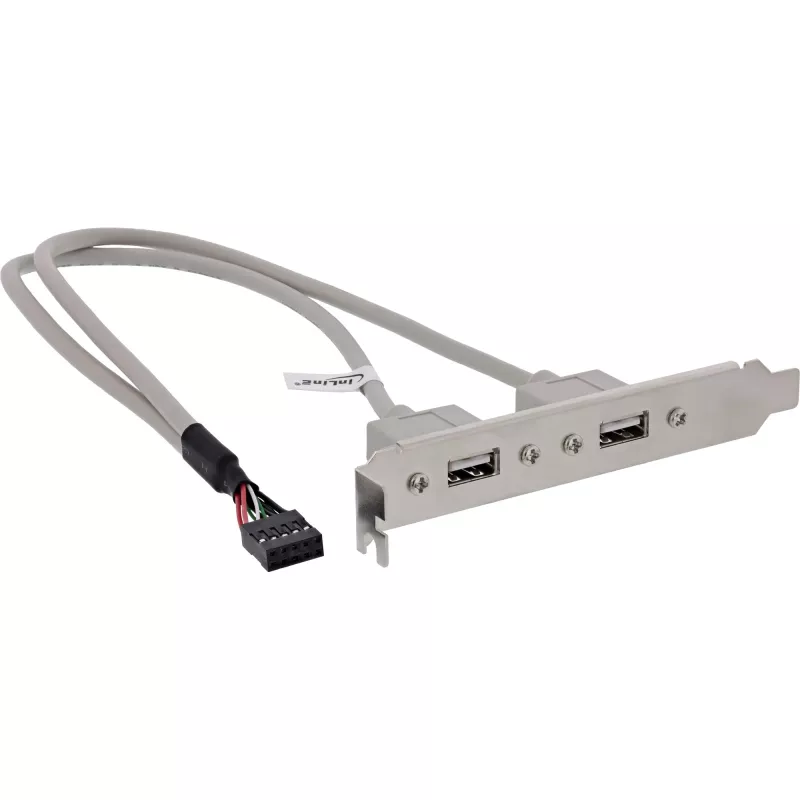
InLine USB 2.0 slotbeugel 2x USB Type-A bus naar 1x 10-pins aansluiting 0,35 m

InLine USB 2.0 slotbeugel 2x USB Type-A bus naar 1x 10-pins aansluiting 0,35 m
11,81 €
The InLine USB 2.0 Slot Bracket provides two USB Type A female ports mounted on a metal bracket and connected by a 0.35 m cable to a 10‑pin IDC connector. Designed to fit into a standard expansion slot at the rear of a desktop computer chassis, the bracket makes front- or rear-panel access to USB de... Lees meer
Voorraad 1014 Code 1487532 Merk INLINE Model 33391 Garantie 2 jaar

Bezorging & retourneren

Verwachte bezorgdatum donderdag, oktober 22
Je blijft op de hoogte via ons uitgebreide trackingsysteem
Betaalopties
BetaalkaartVisaMastercardPayPalApple PayGoogle PayBankoverschrijving

The InLine USB 2.0 Slot Bracket provides two USB Type A female ports mounted on a metal bracket and connected by a 0.35 m cable to a 10‑pin IDC connector. Designed to fit into a standard expansion slot at the rear of a desktop computer chassis, the bracket makes front- or rear-panel access to USB devices simple without modifying the motherboard layout. It supports USB 2.0 data rates for everyday peripherals and is supplied as a single ready-to-install unit.

Advantages

This slot bracket offers a compact and straightforward way to add two external USB Type A ports using an internal 10‑pin connector. The short 0.35 m cable reduces cable clutter inside the case while maintaining stable USB 2.0 connectivity. The metal bracket ensures secure mounting in a standard expansion slot and provides convenient external access for peripherals such as flash drives, keyboards and mice.

Suitable for

Key specifications

How to use

Turn off and unplug the computer before installation. Remove the case panel to access the motherboard and identify an available 10‑pin USB header. Align the IDC connector on the cable with the header, ensuring correct pin orientation, and press it gently into place. Secure the metal bracket in an empty expansion slot at the rear of the case using the existing screw. Reassemble the case, power on the system and verify that connected USB devices are recognized by the operating system.

Recommendations

For reliable operation, connect devices that conform to USB 2.0 or earlier standards. Avoid forcing the IDC connector onto the header and verify pin alignment to prevent damage. If high-power devices are needed, consider using a powered USB hub or a motherboard header that provides sufficient current.

Belangrijkste kenmerken
  • Connecting USB flash drives and external storage
  • Attaching keyboards, mice and other USB input devices
  • Adding accessible USB ports to systems with limited front-panel connectors
  • Use in desktop PCs, workstations and small servers with a compatible 10‑pin motherboard header
  • Interface: 2 x USB 2.0 Type A female to 10‑pin IDC connector
  • Data transfer: USB 2.0 (up to 480 Mbps)
  • Cable length: 0.35 m (approx.)
  • Bracket: metal expansion slot mounting
  • Connector orientation: standard 10‑pin IDC for motherboard header
Specificaties
Aantal per verpakking
1 pc(s)
Afmetingen (B x H x D)
20 x 350 x 120 mm
Breedte
20 mm
Breedte verpakking
175 mm
Diepte
350 mm
Diepte verpakking
225 mm
Geslacht aansluiting 1
Female
Geslacht aansluiting 2
Female
Gewicht
59 g
Gewicht verpakking
66 g
Hoogte
120 mm
Hoogte verpakking
20 mm
Kabellengte
0.35 m
Verpakkingsvolume
800 cm³
Prijsverloop van de afgelopen 6 maanden
InLine USB 2.0 slotbeugel 2x USB Type-A bus naar 1x 10-pins aansluiting 0,35 m
Actueel
11,81 €
Laagste
11,09 €
Hoogste
13,35 €
Wijziging 24 uur
+0,67 €   +6%
Week
+0,64 €   +6%
Maand
+0,69 €   +6%

Populaire producten in deze categorie

Hoi, ik ben de AI-assistent van DistriNode. Ik help je graag met het vinden van producten, het vergelijken van opties, het maken van offerte-PDF's of het openen van supportaanvragen.