
Account Contact
Je winkelwagen
Verzending via DPD & FedEx
Hulp nodig? Vraag het de AI

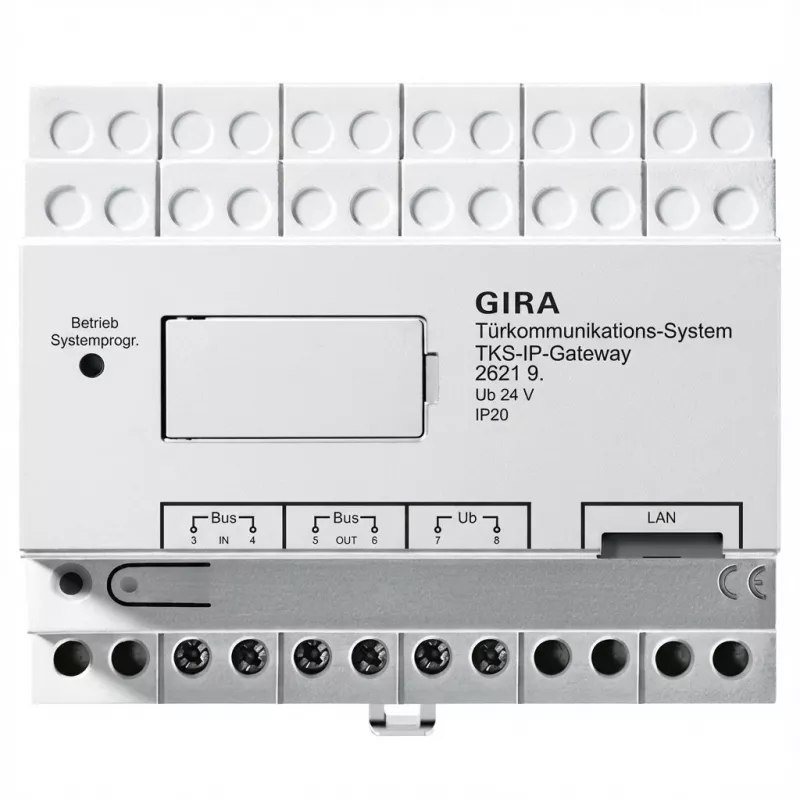
IP-netwerkgateway Gira 262197 (2e generatie) voor TKS-intercomsystemen, ondersteuning voor 5 deuren

IP-netwerkgateway Gira 262197 (2e generatie) voor TKS-intercomsystemen, ondersteuning voor 5 deuren
680,26 €
Gira 262197 (2nd generation) is an IP gateway designed for TKS intercom systems. It connects existing TKS door communication hardware to IP networks, enabling centralized management, remote call routing and integration with building automation. The unit supports up to five doors and acts as a protoc... Lees meer
Voorraad 3 Code 1733773 Merk GIRA Model 262197 Garantie 2 jaar

Bezorging & retourneren

Verwachte bezorgdatum dinsdag, oktober 27
Je blijft op de hoogte via ons uitgebreide trackingsysteem
Betaalopties
BetaalkaartVisaMastercardPayPalApple PayGoogle PayBankoverschrijving

Gira 262197 (2nd generation) is an IP gateway designed for TKS intercom systems. It connects existing TKS door communication hardware to IP networks, enabling centralized management, remote call routing and integration with building automation. The unit supports up to five doors and acts as a protocol converter between legacy intercom stations and modern IP environments, allowing administrators to maintain established TKS installations while extending functionality over Ethernet and LAN infrastructures.

Advantages

The Gira 262197 gateway provides reliable network integration of TKS systems without requiring full replacement of door stations. It supports multi-door configurations up to five entrances, simplifies remote access and call routing, and reduces on-site wiring by using standard IP infrastructure. The device is suitable for incremental upgrades, enabling central management and easier integration with third-party building automation or security platforms while preserving the existing TKS hardware investment.

Suitable for

Key specifications

How to use

Install the Gira IP gateway in a networked location with access to the existing TKS door communication lines and the building LAN. Connect the gateway to the TKS door stations following Gira installation guidelines and wire the Ethernet interface to the local network switch or router. Configure IP addressing and routing through the device's setup interface or the management software specified by Gira, and map each supported door to the corresponding network endpoints. Verify call routing and remote access functions after configuration and integrate with any building automation systems as required.

Recommendations

Place the gateway in a dry, ventilated equipment cabinet near network and intercom cabling. Use a managed switch or segregated VLAN for intercom traffic to improve reliability and security. Apply firmware updates from the manufacturer and test call and integration workflows after configuration changes.

Belangrijkste kenmerken
  • Residential buildings with multiple entrance doors
  • Small to medium commercial properties using TKS intercoms
  • Renovation projects where existing TKS door stations are retained
  • Integrations with building management and access control systems
  • Installations requiring remote call routing and centralized administration
  • Function: IP gateway / protocol converter for TKS intercom systems
  • Door support: up to 5 separate doors/entrances
  • Generation: 2nd generation hardware
  • Network interface: Ethernet (IP) connectivity for LAN integration
  • Use case: enables remote call routing, centralized management and automation integration
Prijsverloop van de afgelopen 6 maanden
IP-netwerkgateway Gira 262197 (2e generatie) voor TKS-intercomsystemen, ondersteuning voor 5 deuren
Actueel
680,26 €
Laagste
667,12 €
Hoogste
725,32 €
Wijziging 24 uur
-2,97 €   0%
Week
-8,79 €   -1%
Maand
+8,37 €   +1%

Populaire producten in deze categorie

Hoi, ik ben de AI-assistent van DistriNode. Ik help je graag met het vinden van producten, het vergelijken van opties, het maken van offerte-PDF's of het openen van supportaanvragen.