
Account Contact
Je winkelwagen
Verzending via DPD & FedEx
Hulp nodig? Vraag het de AI

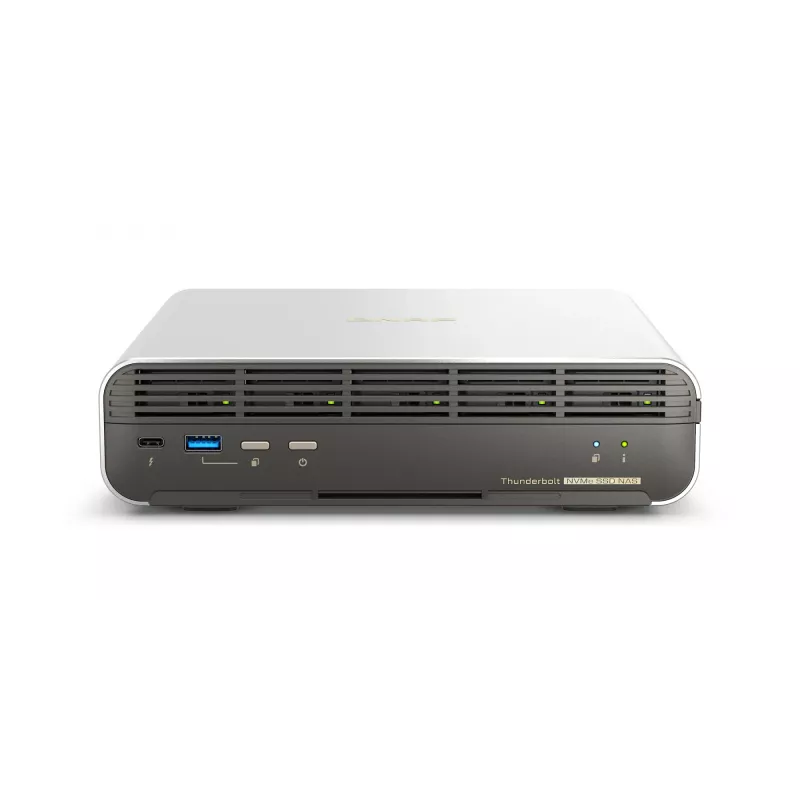
QNAP TBS-H574TX-I5-16G NAS/opslagserver Intel® Core™ i5 i5-1340PE 16 GB

QNAP TBS-H574TX-I5-16G NAS/opslagserver Intel® Core™ i5 i5-1340PE 16 GB
36 mnd.
QNAP TBS-H574TX-I5-16G NAS/opslagserver Intel® Core™ i5 i5-1340PE 16 GB
2.663,43 €
Designed for film sets, small studios, small-scale video production teams and SOHO users, the compact TBS-h574TX Thunderbolt™ 4 all-flash NASbook elevates video production for optimum productivity. It packs high-speed I/O and Intel® Core™ performance required by video production, allowing creators u... Lees meer
Voorraad Niet op voorraadGeen voorraad Code 104245 Merk QNAP Model TBS-H574TX-I5-16G Garantie 3 jaar

Bezorging & retourneren

Designed for film sets, small studios, small-scale video production teams and SOHO users, the compact TBS-h574TX Thunderbolt™ 4 all-flash NASbook elevates video production for optimum productivity. It packs high-speed I/O and Intel® Core™ performance required by video production, allowing creators using Mac® or Windows® to enjoy the smoothest experience ever in real-time video editing, large file transfer, video transcoding, and backup. The TBS-h574TX, as the bridge between pre-production and post-production, takes video projects and team collaboration to the next level. The TBS-h574TX runs the ZFS-based QuTS hero operating system that ensures data integrity. You can also switch to QTS operating system based on your needs.

Ultra-fast RAW file editing

With an E1.S to M.2 SSD adapter attached in each slot, you can flexibly install five E1.S or M.2 PCIe NVMe SSDs for lightning-fast multimedia file editing.

Stay agile for ongoing projects

Hot-swappable M.2 SSD and automatic RAID disk replacement enhance system reliability, reduce the risk of data loss, and smoothen ongoing projects.

Thunderbolt™ 4 for faster direct connections

Two Thunderbolt™ 4 ports allow directly connecting Mac®/PC workstations to the TBS-h574TX, delivering up to 20Gbps for 4K video editing.

Hybrid-architecture CPU for multitasking

The 13th Gen Intel® Core™ processors with hybrid-architecture (P-core and E-core) delivers high performance and efficiency.

2.5GbE and 10GbE as standard

2.5GbE and 10GbE networks accelerate large file transfer and allow for more connected devices/workstations by attaching a network switch.

Faster USB transfer

Two USB 3.2 Gen 2 (10Gbps) ports enable fast file import/export from/to external storage devices.

All-flash NASbook supporting E1.S/M.2 NVMe SSDs – a perfect companion for video production

Compared to large rackmount all-flash array storage, the TBS-h574TX all-flash NASbook features a compact, portable design with five SSD slots yet delivers extreme performance. It is the ideal choice to accelerate ongoing creative video projects from pre-production to post-production, and seamlessly works with USB DAS (TR-004) for file backup/archiving. The TBS-h574TX is always ready for your next project! An E1.S to M.2 SSD adapter is attached to each drive bay of the TBS-h574TX, providing great flexibility to choose between M.2 SSDs and E1.S SSDs on demand.

Enabling hot-swappable M.2 SSDs!

As a frontline video production team, there is the risk of project interruptions due to unexpected SSD failures in storage devices. The innovative TBS-h574TX makes M.2 SSDs become hot-swappable for easier drive replacement. Along with supporting automatic RAID replacement with spares (supported from QTS 5.1 / QuTS hero h5.1), if potential drive errors are detected, the system automatically moves data from the affected drive in a RAID group to a spare, before the data on the affected drive is completely corrupted. This reduces system downtime and data loss risks as it avoids RAID rebuilding.

High-performance SSDs. Effective heat dissipation.

Designed with an excellent cooling system, the TBS-h574TX is equipped with dual fans and supports SSD heatsinks (heatsinks sold separately) to effectively enhance heat dissipation during intensive workloads, allowing creators to confidently enjoy the ultimate performance of SSD.

Thunderbolt™ 4 direct connection to workstations for higher productivity

The TBS-h574TX has two Thunderbolt™ 4 ports for high-speed data transfer (up to 20Gbps bandwidth). Mac® (including M1 and M2 chip models) or Windows® workstations can directly connect to the TBS-h574TX for fast and smooth real-time video editing, allowing for the transfer of a 1TB 4K video just in 11 minutes.

2.5GbE and 10GbE ports | Productive teamwork

The 2.5GbE and 10GbE ports can be used with a network switch to add more connected devices to the TBS-h574TX for collaboration, significantly reducing file transfer times across devices.

USB 3.2 Gen 2 ports | Faster file import/export

Creators and editors can easily import materials from external storage devices to the TBS-h574TX via two USB 3.2 Gen 2 (10Gbps) ports and one USB 2.0 port during pre-/post-production.

USB ports | Easier storage expansion

The TBS-h574TX capacity is scalable by connecting QNAP USB DAS TR-004 or USB JBOD TL-D800C to archive massive number of video files for ever-growing storage and backup needs.

Compact, aesthetic, yet unmatched performance

The TBS-h574TX provides content creators the perfect combination of stylish design and performance. With its metal-finish case, it delivers optimized cooling performance. The set-top design makes the TBS-h574TX space-saving – smaller than A4 paper and with only 2.54 liters in volume – ideal for small-scale studios or video production teams looking for a portable solution.

Ultimate visual experience with real-time video transcoding and 4K HDMI™ output

The TBS-h574TX features built-in Intel® Graphics that accelerates video transcoding and graphical computing for converting videos to different formats smoothly. You can also display videos from the TBS-h574TX to a large screen using HDMI™ (4K @30Hz) for capturing details and clearer quality.

Manage your video projects flexibly with myQNAPcloud Storage

Elevate your video production with the compact and powerful TBS-h574TX. During pre-production, you can save large RAW files (hot data) and handle video transcoding on the TBS-h574TX. In post-production you can store small files (cold data) to myQNAPcloud Storage for file archiving and backup, making it easier to remotely access, synchronize, and share files with cross-site team members.

Build the best music server with Roon

Designed for music lovers, Roon Server identifies your entire music library stored on the TBS-h574TX, and consolidates it into Roon’s interconnected digital library. Experiencing smooth music streaming service, you just need to download Roon Server app from QNAP App Center and enable Roon music library on SSD storage devices with simple setting.

How to use

Install M.2 or E1.S NVMe SSDs in the five drive slots (E1.S-to-M.2 adapters are preinstalled). Connect workstations directly via Thunderbolt™ 4 for high-speed editing, or attach the device to a network switch using the 2.5GbE/10GbE ports for multi-user collaboration. Use the USB 3.2 Gen 2 ports to import/export files from external drives. Configure RAID and hot-spare options in QuTS hero (or QTS) to enable automatic RAID replacement and protect ongoing projects. Use the HDMI output for local 4K preview and the myQNAPcloud Storage service for remote archiving and synchronization.

Recommendations

For sustained high-performance video editing, use enterprise-grade NVMe SSDs with good endurance ratings, enable SSD heatsinks and ensure proper ventilation. Configure RAID with an available hot spare and keep firmware and OS updated. For collaborative workflows, connect the TBS-h574TX to a 10GbE-capable switch to maximize throughput across multiple workstations.

Belangrijkste kenmerken
  • Real-time 4K video editing and post-production workflows
  • Small studio and film set media storage and collaboration
  • SOHO and small-scale video production teams requiring portable high-performance storage
  • High-speed file transfer, transcoding and backup tasks
  • Processor: 13th Gen Intel® Core™ (Intel Core i5 configuration)
  • Memory: 16 GB (model TBS-h574TX-I5-16G)
  • Storage bays: 5 x E1.S / M.2 PCIe NVMe SSD (E1.S-to-M.2 adapters attached)
  • External ports: 2 x Thunderbolt™ 4 (up to 20 Gbps), 2 x USB 3.2 Gen 2 (10 Gbps), 1 x USB 2.0
  • Network: 2.5GbE and 10GbE ports
  • Video output: HDMI™ 4K @ 30Hz
  • OS: QuTS hero (ZFS) with option to switch to QTS
  • Weight: 2.24 kg
Specificaties
Aantal HDMI-poorten
1
Aantal Thunderbolt-poorten
2
Aantal USB 2.0-poorten
1
Aantal USB 3.2 Gen 2 (3.1 Gen 2) Type-A-poorten
2
Aantal ventilatoren
3 fan(s)
Apparaatklasse
Small & Medium Business
Bedrijfstemperatuur (T-T)
0 - 40 °C
Boostfrequentie processor
4.5 GHz
Breedte
215 mm
Breedte verpakking
284.1 mm
Capaciteit voeding (PSU)
120 W
Diepte
199 mm
Diepte verpakking
71 mm
Ethernet LAN
Yes
Ethernet LAN (RJ-45)-poorten
2
Ethernet-LAN-snelheden
100,1000,2500,5000,10000 Mbit/s
Flashgeheugen
5000 MB
Garantieperiode
3 year(s)
Geïnstalleerde opslagstations
No
Gewicht
2.24 kg
Gewicht verpakking
3.41 kg
HDMI-versie
1.4b
Hoogte
60 mm
Hoogte verpakking
400 mm
Hot-swap bays
Yes
Interface opslagstation
M.2
Intern geheugen
16 GB
Jumbo frames-ondersteuning
Yes
Led-indicatoren
Status, USB
Model geïntegreerde videokaart
Intel Iris Xe Graphics
Ondersteunde typen opslagstations
HDD & SSD
Opslagtemperatuur (T-T)
-20 - 70 °C
Processorcache
12 MB
Processorcores
12
Processorfamilie
Intel Core i5
Processormerk
Intel
Processormodel
i5-1340PE
Processorthreads
16
Relatieve luchtvochtigheid tijdens gebruik (H-H)
5 - 95%
Resetknop
Yes
Stroomverbruik (typisch)
46 W
Type
NAS
Type geïnstalleerd opslagstation
No
Type verpakking
Box
USB-poort
Yes
Zoemer
Yes

Handleiding

Document openen
Prijsverloop van de afgelopen 6 maanden
QNAP TBS-H574TX-I5-16G NAS/opslagserver Intel® Core™ i5 i5-1340PE 16 GB
Actueel
2.663,43 €
Laagste
2.583,94 €
Hoogste
2.704,58 €
Wijziging 24 uur
-41,14 €   -2%
Week
-6,98 €   0%
Maand
—   

Populaire producten in deze categorie

Hoi, ik ben de AI-assistent van DistriNode. Ik help je graag met het vinden van producten, het vergelijken van opties, het maken van offerte-PDF's of het openen van supportaanvragen.