
Account Contact
Je winkelwagen
Verzending via DPD & FedEx
Hulp nodig? Vraag het de AI

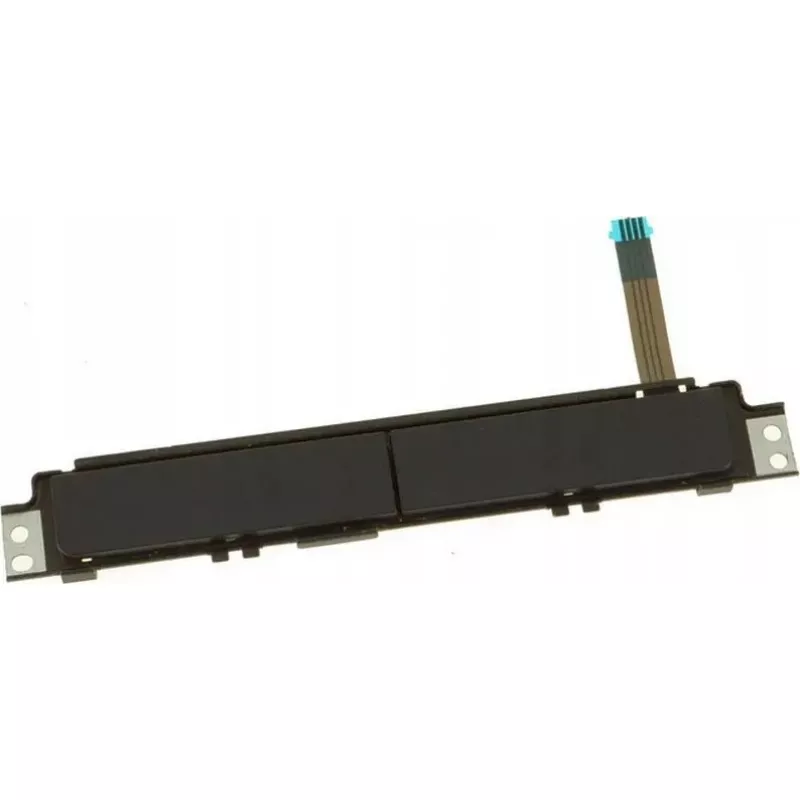
Touchpad-knoppenprintplaat Dell XKYX9 — vervangende touchpad-knoppenprintplaat voor compatibele Dell-laptops

Touchpad-knoppenprintplaat Dell XKYX9 — vervangende touchpad-knoppenprintplaat voor compatibele Dell-laptops
53,15 €
Replacement touchpad button board for compatible Dell laptops designed to restore left and right click functions and improve input reliability. This component replaces the original touchpad button assembly and is intended for repair, refurbishment, or maintenance of Dell notebook models that use a m... Lees meer
Voorraad Niet op voorraadGeen voorraad Code 2573548 Merk DELL Model XKYX9 Garantie 2 jaar

Bezorging & retourneren

Replacement touchpad button board for compatible Dell laptops designed to restore left and right click functions and improve input reliability. This component replaces the original touchpad button assembly and is intended for repair, refurbishment, or maintenance of Dell notebook models that use a modular button board. The part is compact and engineered to interface with the laptop’s existing touchpad mechanism and internal connector layout.

Advantages

The replacement board provides a direct restore of mechanical button feedback and electronic signaling for left and right clicks, helping to recover full touchpad control without replacing the entire top case. Designed to match form and function of compatible Dell assemblies, it reduces repair time and cost for technicians and end users. Durable contact points and mounting locations maintain alignment with the touchpad surface and ensure consistent click response after installation.

Suitable for

  • Repairing Dell notebooks with a faulty touchpad button assembly
  • Refurbishment projects for resale or extended device lifetime
  • Technician-level maintenance and component replacement
  • Users needing to restore left/right click functionality without full chassis replacement

Key specifications

  • Function: Restores left and right touchpad click inputs
  • Compatibility: Designed for use in compatible Dell laptop models that accept a modular touchpad button board
  • Form factor: Compact button board sized to fit beneath the touchpad surface and align with mounting points
  • Connections: Internal ribbon or flex connector to mate with the laptop’s touchpad circuitry
  • Material: PCB with mechanical contact points and mounting holes for secure installation

How to use

Power off the laptop and disconnect any external power source before beginning. Remove the laptop’s bottom cover or keyboard/top case following the manufacturer’s service instructions to access the touchpad area. Carefully disconnect the old button board from its ribbon or flex connector and unscrew any mounting fasteners. Align the replacement board with the mounting points, secure it with the original screws, and reconnect the internal connector. Reassemble the laptop and perform a functional check to verify left and right click operation in the operating system.

Recommendations

Handle the board by its edges to avoid contaminating contact points, use ESD protection while working inside the laptop, and confirm model-level compatibility prior to purchase. If unsure about disassembly, seek assistance from a qualified technician to prevent damage to the touchpad or surrounding components.

Belangrijkste kenmerken
  • Repairing Dell notebooks with a faulty touchpad button assembly
  • Refurbishment projects for resale or extended device lifetime
  • Technician-level maintenance and component replacement
  • Users needing to restore left/right click functionality without full chassis replacement
  • Function: Restores left and right touchpad click inputs
  • Compatibility: Designed for use in compatible Dell laptop models that accept a modular touchpad button board
  • Form factor: Compact button board sized to fit beneath the touchpad surface and align with mounting points
  • Connections: Internal ribbon or flex connector to mate with the laptop’s touchpad circuitry
  • Material: PCB with mechanical contact points and mounting holes for secure installation
Prijsverloop is nog niet beschikbaar
We zijn nog bezig met het verzamelen van voldoende dagelijkse prijsgegevens voor dit product.

Review schrijven

Beoordeling *
Je naam wordt openbaar getoond – je mag ook een bijnaam gebruiken. We nodigen kopers uit om reviews te schrijven. We controleren reviews vóór plaatsing en plaatsen ook kritische reviews.

Populaire producten in deze categorie

Verkoper: UAB KUR LT · Laisvės pr. 125A, LT-06118 Vilnius, Litouwen · Bedrijfsnummer 303192950 · Btw-nummer LT100008198612 · Verzending vanuit de EU (Litouwen)
Hoi, ik ben de AI-assistent van DistriNode. Ik help je graag met het vinden van producten, het vergelijken van opties, het maken van offerte-PDF's of het openen van supportaanvragen.
Alle categorieën