
Account Contact
Je winkelwagen
Verzending via DPD & FedEx
Hulp nodig? Vraag het de AI

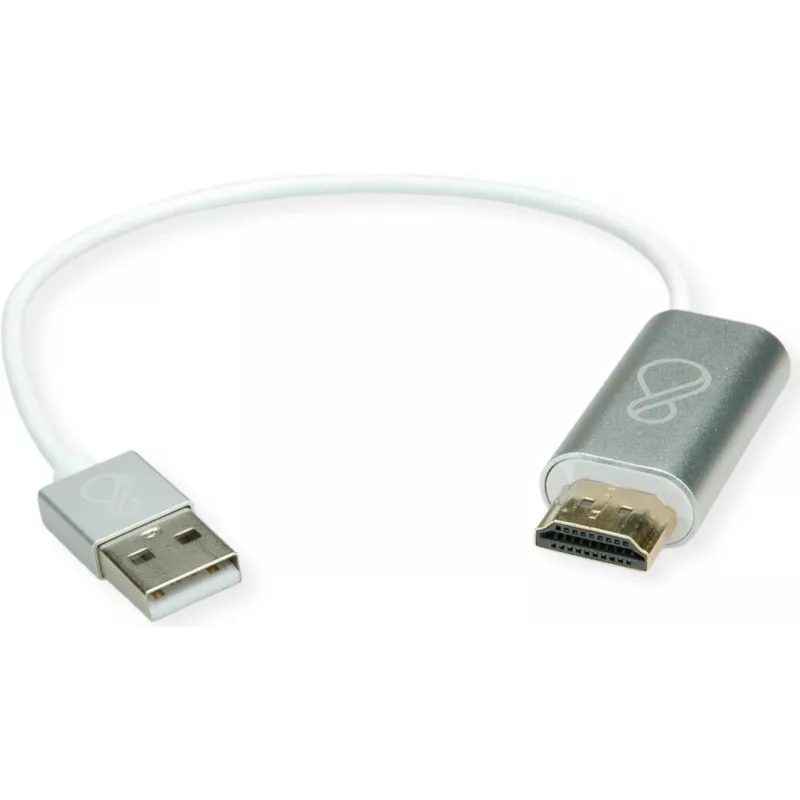
Adapter Bachmann HDMI naar USB-C en USB-A model 920.0008 — HDMI naar USB-C/USB-A videoadapter

Adapter Bachmann HDMI naar USB-C en USB-A model 920.0008 — HDMI naar USB-C/USB-A videoadapter
120,15 €
The Bachmann HDMI to USB-C and USB-A adapter (model 920.0008) converts an HDMI video output into signals compatible with USB-C and USB-A host ports where the host supports video input over those interfaces. The compact, portable adapter enables direct connection of HDMI-equipped sources to modern la... Lees meer
Voorraad Niet op voorraadGeen voorraad Code 2222288 Merk BACHMANN Model 920.0008 Garantie 2 jaar

Bezorging & retourneren

The Bachmann HDMI to USB-C and USB-A adapter (model 920.0008) converts an HDMI video output into signals compatible with USB-C and USB-A host ports where the host supports video input over those interfaces. The compact, portable adapter enables direct connection of HDMI-equipped sources to modern laptops, docking stations or USB display host ports without replacing existing HDMI cables. It is designed for simple interoperability in meeting rooms, offices and home setups, facilitating display extension or mirroring when the receiving device accepts video over USB-C (DisplayPort Alt Mode) or USB-A (with compatible display drivers).

Advantages

The adapter provides a straightforward way to bridge HDMI sources and USB-C or USB-A hosts, reducing the need for additional converter boxes or special cables. Its small form factor makes it easy to carry between workspaces and simplifies temporary setups in meeting rooms. The adapter supports plug-and-play connection in environments where the host device recognizes video input over the USB interface, minimizing installation effort and configuration time.

Suitable for

  • Connecting an HDMI-equipped camera, media player or laptop to a laptop or docking station with a USB-C display input.
  • Temporary presentation setups in meeting rooms where a host accepts video over USB-C or USB-A.
  • Home office setups requiring display mirroring or extension from an HDMI source to a USB-C/USB-A capable monitor or capture device.

Key specifications

  • Conversion direction: HDMI output (source) to USB-C and USB-A host interfaces.
  • Supported video use: display mirroring or extension where host supports video over USB-C (DisplayPort Alt Mode) or USB-A with compatible drivers.
  • Form factor: compact, portable adapter for inline connection.
  • Power: bus-powered from the host port when supported; additional power may be required depending on host capabilities and video mode.
  • Compatibility: intended for use with devices that accept video input via USB-C or USB-A; compatibility depends on host support for video over USB and available drivers.

How to use

Connect the HDMI cable from the source device to the adapter's HDMI input, then plug the adapter into the host computer's USB-C or USB-A port intended for video input. If the host supports video input over the chosen USB interface, the display should be detected automatically; otherwise install any required drivers or enable DisplayPort Alt Mode on the host. Adjust display settings on the host device to select mirroring or extension as needed. Disconnect the adapter when the connection is no longer required.

Recommendations

Verify that the receiving host supports video input over USB-C (DisplayPort Alt Mode) or USB-A with appropriate display drivers before use. For reliable performance, use short, high-quality HDMI cables and ensure the host has sufficient power delivery or external power if needed for certain modes. Test the adapter in advance of important presentations to confirm compatibility and display settings.

Belangrijkste kenmerken
  • Connecting an HDMI-equipped camera, media player or laptop to a laptop or docking station with a USB-C display input.
  • Temporary presentation setups in meeting rooms where a host accepts video over USB-C or USB-A.
  • Home office setups requiring display mirroring or extension from an HDMI source to a USB-C/USB-A capable monitor or capture device.
  • Conversion direction: HDMI output (source) to USB-C and USB-A host interfaces.
  • Supported video use: display mirroring or extension where host supports video over USB-C (DisplayPort Alt Mode) or USB-A with compatible drivers.
  • Form factor: compact, portable adapter for inline connection.
  • Power: bus-powered from the host port when supported; additional power may be required depending on host capabilities and video mode.
  • Compatibility: intended for use with devices that accept video input via USB-C or USB-A; compatibility depends on host support for video over USB and available drivers.
Prijsverloop is nog niet beschikbaar
We zijn nog bezig met het verzamelen van voldoende dagelijkse prijsgegevens voor dit product.

Populaire producten in deze categorie

Hoi, ik ben de AI-assistent van DistriNode. Ik help je graag met het vinden van producten, het vergelijken van opties, het maken van offerte-PDF's of het openen van supportaanvragen.