
Account Contact
Je winkelwagen
Verzending via DPD & FedEx
Hulp nodig? Vraag het de AI

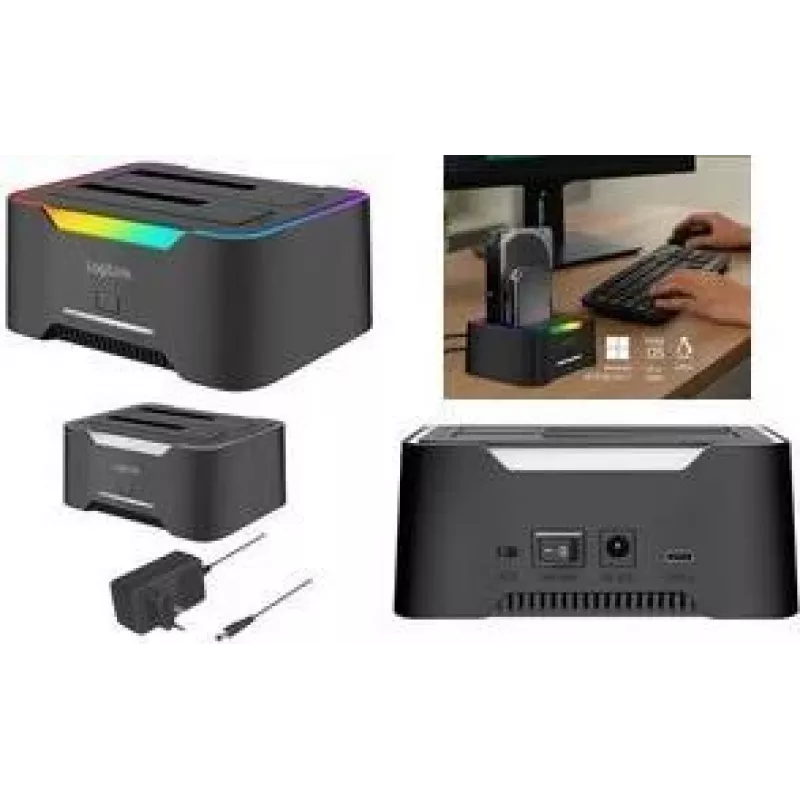
Dockingstation LOGILINK Quickport QP0036, USB 3.2, 2-voudig voor 2,5/3,5 inch SATA HDD/SSD

Dockingstation LOGILINK Quickport QP0036, USB 3.2, 2-voudig voor 2,5/3,5 inch SATA HDD/SSD
41,88 €
LOGILINK Quickport QP0036 is a 2‑port HDD docking station with USB 3.2 connectivity designed for direct use of 2.5" and 3.5" SATA HDDs and SSDs. It enables quick access to internal drives externally, supports hot‑swap operation and offers a simple interface for reading, writing, cloning and backing ... Lees meer
Voorraad 78 Code 2580350 Merk LOGILINK Model QP0036 Garantie 2 jaar

Bezorging & retourneren

Verwachte bezorgdatum donderdag, oktober 22
Je blijft op de hoogte via ons uitgebreide trackingsysteem
Betaalopties
BetaalkaartVisaMastercardPayPalApple PayGoogle PayBankoverschrijving

LOGILINK Quickport QP0036 is a 2‑port HDD docking station with USB 3.2 connectivity designed for direct use of 2.5" and 3.5" SATA HDDs and SSDs. It enables quick access to internal drives externally, supports hot‑swap operation and offers a simple interface for reading, writing, cloning and backing up drives without installing them inside a computer. The docking station is suitable for data transfer, recovery tasks and temporary expansion of storage capacity.

Advantages

The device provides USB 3.2 transfer speeds for efficient file operations and supports both 2.5" and 3.5" SATA form factors, accommodating HDDs and SSDs. Hot‑swap functionality allows drives to be inserted and removed while powered, and the two independent bays permit simultaneous use of two drives. The plug‑and‑play design removes the need for internal mounting or additional drivers on most operating systems.

Suitable for

Key specifications

How to use

Connect the docking station to a host computer using the supplied USB 3.2 cable and power it on. Insert a 2.5" or 3.5" SATA drive into one of the bays until it seats securely. The operating system should detect the drive automatically and present it as an external storage device. For cloning, follow the manufacturer’s cloning procedure if the device supports standalone cloning, or use cloning or backup software on the connected computer to duplicate data between drives. Remove drives after safely ejecting them from the operating system or powering the docking station down if required.

Recommendations

Use a USB 3.2 connection for optimal transfer speeds and connect the docking station to a USB port that provides sufficient power or use the supplied external power adapter if applicable. Always perform safe eject procedures in the operating system before removing drives to avoid data corruption. For long‑term storage or frequent data transfers, consider using SSDs for higher durability and faster performance.

Belangrijkste kenmerken
  • Direct access to data on 2.5" and 3.5" SATA HDDs and SSDs
  • Cloning drives or duplicating content between two drives
  • Backup and quick transfer of large files
  • Data recovery from removed or unused drives
  • Temporary expansion of storage for laptops and desktops
  • Interface: USB 3.2 for host connection
  • Drive bays: 2 independent SATA bays compatible with 2.5" and 3.5" HDD/SSD
  • Supported drive types: SATA HDD and SATA SSD
  • Operation: Hot‑swap support for drive insertion and removal while powered
  • Functionality: Read/write access and drive cloning capability
Prijsverloop van de afgelopen 6 maanden
Dockingstation LOGILINK Quickport QP0036, USB 3.2, 2-voudig voor 2,5/3,5 inch SATA HDD/SSD
Actueel
41,88 €
Laagste
40,70 €
Hoogste
59,00 €
Wijziging 24 uur
+1,11 €   +3%
Week
+0,90 €   +2%
Maand
+0,66 €   +2%

Populaire producten in deze categorie

Verkoper: UAB KUR LT · Laisvės pr. 125A, LT-06118 Vilnius, Litouwen · Bedrijfsnummer 303192950 · Btw-nummer LT100008198612 · Verzending vanuit de EU (Litouwen)
Hoi, ik ben de AI-assistent van DistriNode. Ik help je graag met het vinden van producten, het vergelijken van opties, het maken van offerte-PDF's of het openen van supportaanvragen.