
Account Contact
Je winkelwagen
Verzending via DPD & FedEx
Hulp nodig? Vraag het de AI

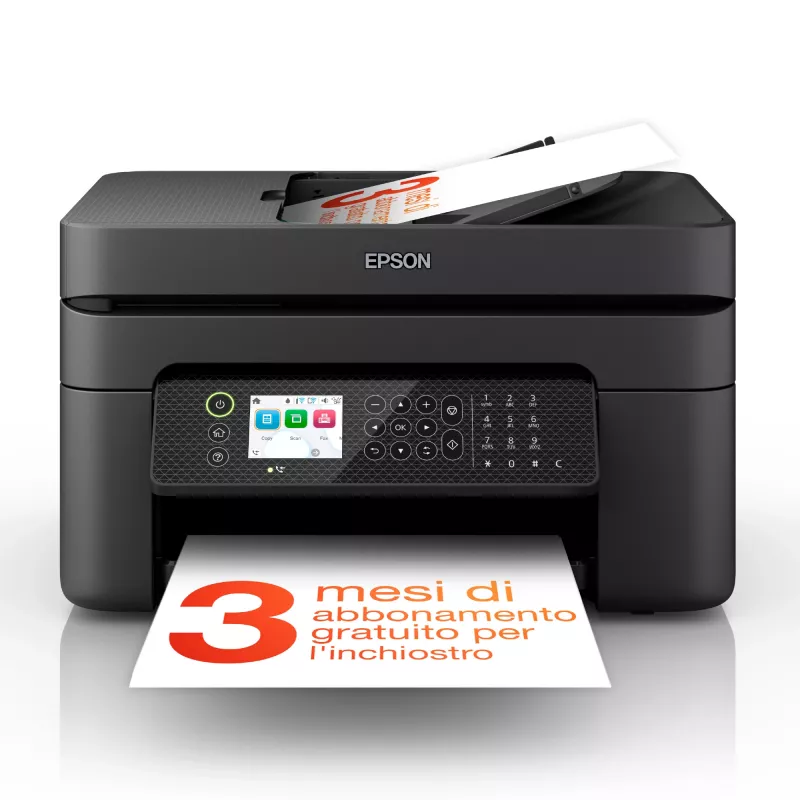
Epson WorkForce WF-2950DWF inkjet A4 5760 x 1440 DPI 33 ppm Wi-Fi

Epson WorkForce WF-2950DWF inkjet A4 5760 x 1440 DPI 33 ppm Wi-Fi
113,96 €
The Epson WorkForce WF-2950DWF Inkjet Colour Printing multifunction printer combines colour printing, scanning, copying and faxing in a compact black chassis designed for home and small office environments. It delivers high-resolution output up to 5760 x 1440 DPI for photos and documents, supports a... Lees meer
Voorraad 62 Code 1431048 Merk EPSON Model C11CK62402 Garantie 2 jaar

Bezorging & retourneren

Verwachte bezorgdatum dinsdag, oktober 20
Je blijft op de hoogte via ons uitgebreide trackingsysteem
Betaalopties
BetaalkaartVisaMastercardPayPalApple PayGoogle PayBankoverschrijving

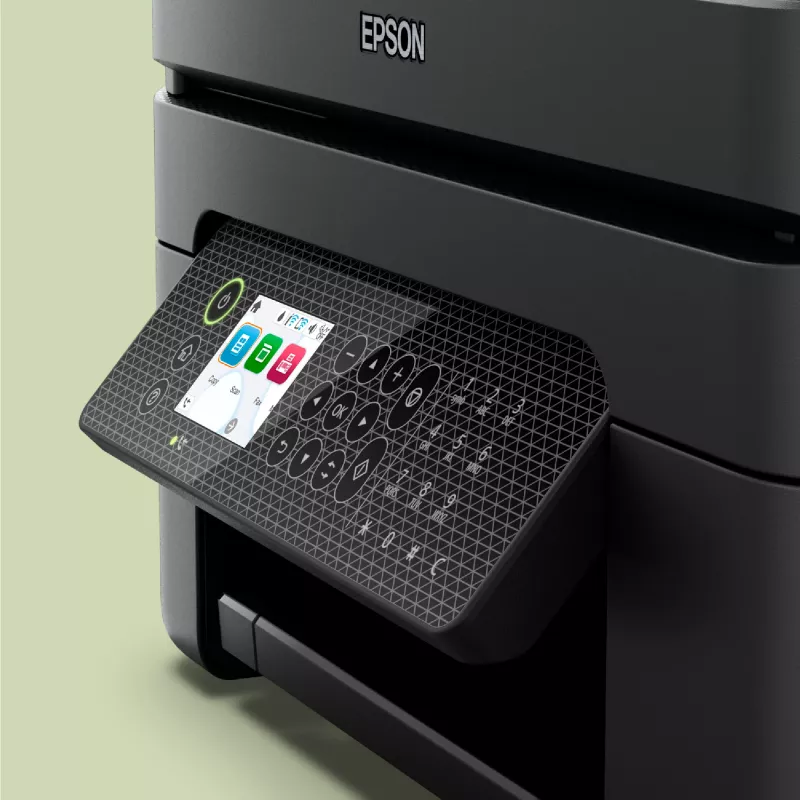
The Epson WorkForce WF-2950DWF Inkjet Colour Printing multifunction printer combines colour printing, scanning, copying and faxing in a compact black chassis designed for home and small office environments. It delivers high-resolution output up to 5760 x 1440 DPI for photos and documents, supports automatic duplex printing to save paper, and offers wireless connectivity for convenient mobile and networked printing. The device balances print quality and everyday performance with a maximum duty cycle suitable for moderate monthly workloads.

Advantages

The printer produces high-detail colour prints and photos thanks to a maximum resolution of 5760 x 1440 DPI, while colour scanning at an optical resolution of 1200 x 2400 DPI captures fine detail for digitising documents. Automatic duplex printing reduces paper use and supports two-sided document workflows. Integrated Wi‑Fi enables printing from smartphones and tablets without cables, and the multifunction design combines scanning, copying and faxing into a single unit to save space. The unit’s lightweight construction aids installation and repositioning within a workspace.

Suitable for

  • Home offices and small businesses requiring colour prints, scans and copies
  • Users who need duplex printing for two-sided documents
  • Mobile printing from smartphones and tablets via Wi‑Fi
  • Occasional faxing alongside everyday printing tasks

Key specifications

  • Print technology: Inkjet colour printing
  • Maximum print resolution: 5760 x 1440 DPI
  • Print speed: up to 18 pages per minute (colour, normal quality) and up to 33 pages per minute (black, normal quality, A4/US Letter)
  • Scanning: colour scanning with optical resolution up to 1200 x 2400 DPI
  • Copying: colour copying capability
  • Duplex: automatic double‑sided printing
  • Connectivity: Wi‑Fi enabled for wireless printing (no Ethernet LAN)
  • Maximum paper size: A4
  • Maximum duty cycle: up to 3000 pages per month
  • Weight: approximately 5.3 kg
  • Product colour: black

How to use

Place the printer on a stable, level surface near a power outlet and within Wi‑Fi range of your router or mobile device. Install the ink cartridges and load A4 paper into the input tray according to the user guide. Connect the printer to your wireless network using the control panel setup or the included software, then install the drivers on your computer or mobile device. Use the scan and copy functions from the control panel or the scanning software; send and receive faxes using the dedicated fax settings. For double‑sided printing, select duplex print in the printer settings before sending a print job.

Recommendations

For consistent print quality and reliable operation, use manufacturer‑recommended ink cartridges and paper types within the supported weight range. Perform regular cleaning cycles and occasional alignment from the printer maintenance menu to maintain scanning and printing accuracy. Limit monthly usage to levels aligned with the device’s maximum duty cycle to prolong component life.

Belangrijkste kenmerken
  • Home offices and small businesses requiring colour prints, scans and copies
  • Users who need duplex printing for two-sided documents
  • Mobile printing from smartphones and tablets via Wi‑Fi
  • Occasional faxing alongside everyday printing tasks
  • Print technology: Inkjet colour printing
  • Maximum print resolution: 5760 x 1440 DPI
  • Print speed: up to 18 pages per minute (colour, normal quality) and up to 33 pages per minute (black, normal quality, A4/US Letter)
  • Scanning: colour scanning with optical resolution up to 1200 x 2400 DPI
  • Copying: colour copying capability
  • Duplex: automatic double‑sided printing
  • Connectivity: Wi‑Fi enabled for wireless printing (no Ethernet LAN)
  • Maximum paper size: A4
  • Maximum duty cycle: up to 3000 pages per month
  • Weight: approximately 5.3 kg
  • Product colour: black
Specificaties
Aantal printcartridges
4
Aantal USB 2.0-poorten
1
AC-ingangsfrequentie
50 - 60 Hz
AC-ingangsspanning
100 - 240 V
Afdrukkleuren
Black, Cyan, Magenta, Yellow
Automatische documentinvoer (ADF)
No
Beveiligingsalgoritmen
64-bit WEP, 128-bit WEP, WPA-PSK, WPA-TKIP, WPA2-AES, WPA2-PSK, WPA3-SAE
Breedte
375 mm
Diepte
300 mm
Dubbelzijdig printen
Yes
Duplexfuncties
Print
Enveloppenformaten
10, C6, DL
Ethernet LAN
No
Faxen
Colour faxing
Faxgeheugen
100 pages
Faxverzendsnelheid
3 sec/page
Formaten ISO A-serie (A0...A9)
A4, A5, A6
Fotopapierformaten
10x15,13x18 cm
Gewicht
5.3 kg
Hoogte
218 mm
Ingebouwd display
Yes
Invoercapaciteit automatische documentinvoer (ADF)
30 sheets
ISO B-formaten (B0...B9)
B5, B6
Kleurendisplay
Yes
Kopiëren
Colour copying
Marktpositionering
Business
Maximaal papierformaat ISO A-serie
A4
Maximale resolutie
5760 x 1440 DPI
Maximale werkcyclus
3000 pages per month
Mediagewicht papierlade
64 - 300 g/m²
Mediatypen papierlade
Envelopes, Photo paper, Plain paper
Modemsnelheid
33.6 Kbit/s
Modus dubbelzijdig printen
Auto
Ondersteunde Mac-besturingssystemen
Mac OS X 10.10 Yosemite, Mac OS X 10.11 El Capitan, Mac OS X 10.12 Sierra, Mac OS X 10.13 High Sierra, Mac OS X 10.14 Mojave, Mac OS X 10.15 Catalina, Mac OS X 10.15.3 Catalina, Mac OS X 10.2 Jaguar, Mac OS X 10.3 Panther, Mac OS X 10.4 Tiger, Mac OS X 10.5 Leopard, Mac OS X 10.6 Snow Leopard, Mac OS X 10.7 Lion, Mac OS X 10.8 Mountain Lion, Mac OS X 10.9 Mavericks, Mac OS X 11.0 Big Sur, Mac OS X 12.0 Monterey
Ondersteunde serverbesturingssystemen
Windows Server 2003, Windows Server 2008 R2, Windows Server 2012 R2, Windows Server 2012 x64, Windows Server 2016
Ondersteunde Windows-besturingssystemen
Windows 10, Windows 11, Windows 7, Windows 8, Windows Vista, Windows XP
Optische scanresolutie
1200 x 2400 DPI
Printen
Colour printing
Printsnelheid (kleur, normale kwaliteit, A4/US Letter)
18 ppm
Printsnelheid (zwart, normale kwaliteit, A4/US Letter)
33 ppm
Printtechnologie
Inkjet
Productkleur
Black
Randloos printen
Yes
Scannen
Colour scanning
Scannertype
ADF scanner
Scantechnologie
CIS
Snelkiezen
Yes
Stroomverbruik (gereed)
4.6 W
Stroomverbruik (kopiëren)
12 W
Stroomverbruik (slaapstand)
0.7 W
Stroomverbruik (uit)
0.2 W
Technologieën voor mobiel printen
Apple AirPrint, Epson Connect, Epson Email Print, Epson Remote Print, Epson Scan to Cloud, Epson iPrint, Mopria Print Service
Totaal aantal invoerladen
1
Totale invoercapaciteit
100 sheets
USB-poort
Yes
Wifi
Yes
Wifi-standaarden
802.11b, 802.11g, Wi-Fi 4 (802.11n)

Handleiding

Document openen
Prijsverloop van de afgelopen 6 maanden
Epson WorkForce WF-2950DWF inkjet A4 5760 x 1440 DPI 33 ppm Wi-Fi
Actueel
113,96 €
Laagste
113,05 €
Hoogste
114,62 €
Wijziging 24 uur
+0,31 €   +0%
Week
-0,66 €   -1%
Maand
-0,08 €   0%

Onafhankelijke reviews van techmedia

rtings.comOlivier
6/10

“The Epson WorkForce WF-2950 is an all-in-one inkjet printer intended for small offices. It replaces the Epson WorkForce WF-2850 but remains very similar in design, with only minor changes beneath the skin.”

Pluspunten
  • Has flatbed scanner and ADF
  • Decent range of connection options
  • Good printed document quality
Minpunten
  • Slow printing speed
  • Low page yields
  • Somewhat cheap build quality
Lees de volledige review op rtings.com →

Populaire producten in deze categorie

Hoi, ik ben de AI-assistent van DistriNode. Ik help je graag met het vinden van producten, het vergelijken van opties, het maken van offerte-PDF's of het openen van supportaanvragen.