
Account Contact
Je winkelwagen
Verzending via DPD & FedEx
Hulp nodig? Vraag het de AI

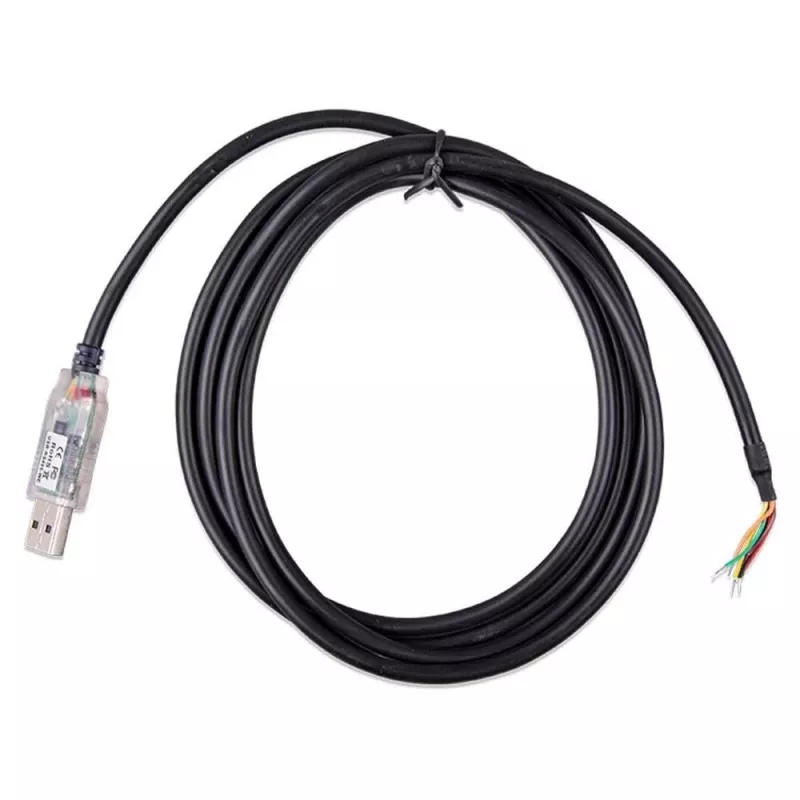
USB-interfacekabel Victron Energy ASS030572018 1,8 m RS485 voor datacommunicatie

USB-interfacekabel Victron Energy ASS030572018 1,8 m RS485 voor datacommunicatie
38,52 €
The USB interface cable Victron Energy ASS030572018 1.8 m RS485 for data communication is a dedicated communication lead for connecting compatible Victron Energy devices to a computer or monitoring interface. The cable provides a USB-to-RS485 connection that supports data transfer, configuration, fi... Lees meer
Voorraad 9 Code 2378918 Merk VICTRON ENERGY Model ASS030572018 Garantie 2 jaar

Bezorging & retourneren

Verwachte bezorgdatum maandag, oktober 19
Je blijft op de hoogte via ons uitgebreide trackingsysteem
Betaalopties
BetaalkaartVisaMastercardPayPalApple PayGoogle PayBankoverschrijving

The USB interface cable Victron Energy ASS030572018 1.8 m RS485 for data communication is a dedicated communication lead for connecting compatible Victron Energy devices to a computer or monitoring interface. The cable provides a USB-to-RS485 connection that supports data transfer, configuration, firmware updates and real-time monitoring when used with supported Victron products and software. At 1.8 m length it offers flexible placement and safe separation between equipment and a host computer.

Advantages

This cable delivers a stable serial link using the RS485 protocol, ensuring reliable bidirectional communication with Victron devices over moderate distances. Its USB endpoint allows straightforward connection to modern PCs and laptops without requiring legacy serial ports. The 1.8 metre length reduces cable clutter while providing sufficient reach for typical installation and servicing tasks. Designed for use with Victron equipment, it supports common data and configuration operations used by installers and system integrators.

Suitable for

Key specifications

How to use

Install any required drivers or software provided by the device manufacturer on the host computer before connecting the cable. Plug the USB end into the computer and the RS485 connector into the Victron device or interface as instructed by the device manual. Launch the Victron configuration or monitoring application and select the appropriate communication port. Follow on-screen prompts to perform data transfer, configure parameters or apply firmware updates. Disconnect the cable after completing configuration or when not in use to reduce wear and prevent unintended changes.

Recommendations

For reliable communication, avoid routing the cable near high-power AC or DC cabling that could introduce interference. Use the supplied or recommended drivers and the latest compatible Victron software when performing firmware updates. Secure connections at both ends and keep the cable length as short as practical in electrically noisy environments to improve signal integrity.

Belangrijkste kenmerken
  • Connecting Victron Energy inverters, chargers or monitoring modules to a computer for configuration
  • Performing firmware updates and parameter adjustments via Victron software
  • Logging and real-time monitoring of system performance on a PC
  • Installer setup, commissioning and diagnostic tasks in residential or small commercial systems
  • Interface: USB to RS485 serial communication
  • Cable length: 1.8 metres
  • Direction: bidirectional data transfer compatible with RS485 protocol
  • Compatibility: designed for use with compatible Victron Energy devices and supporting software
  • Use case: data communication, configuration, firmware updates and monitoring
Prijsverloop van de afgelopen 6 maanden
USB-interfacekabel Victron Energy ASS030572018 1,8 m RS485 voor datacommunicatie
Actueel
38,52 €
Laagste
37,92 €
Hoogste
47,59 €
Wijziging 24 uur
+0,49 €   +1%
Week
+0,35 €   +1%
Maand
-0,03 €   0%

Populaire producten in deze categorie

Hoi, ik ben de AI-assistent van DistriNode. Ik help je graag met het vinden van producten, het vergelijken van opties, het maken van offerte-PDF's of het openen van supportaanvragen.