
Account Contact
Je winkelwagen
Verzending via DPD & FedEx
Hulp nodig? Vraag het de AI

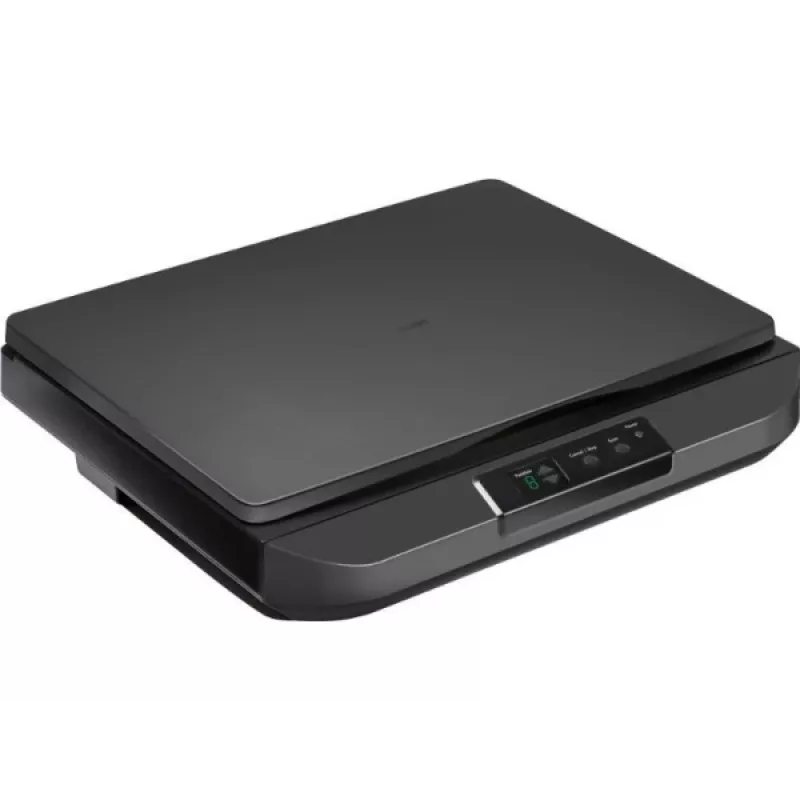
Vlakbedscanner Avision FB5100 A3 600 dpi USB

Vlakbedscanner Avision FB5100 A3 600 dpi USB
461,93 €
Avision FB5100 A3 600 dpi USB is a flatbed scanner designed to capture high-resolution digital images from books, large-format documents, photographs and artwork. The device supports A3 document size and offers an optical resolution up to 600 dpi with USB connectivity for direct connection to a comp... Lees meer
Voorraad 4 Code 1163520 Merk AVISION Model 000-1129-02G Garantie 2 jaar

Bezorging & retourneren

Verwachte bezorgdatum vrijdag, oktober 16
Je blijft op de hoogte via ons uitgebreide trackingsysteem
Betaalopties
BetaalkaartVisaMastercardPayPalApple PayGoogle PayBankoverschrijving

Avision FB5100 A3 600 dpi USB is a flatbed scanner designed to capture high-resolution digital images from books, large-format documents, photographs and artwork. The device supports A3 document size and offers an optical resolution up to 600 dpi with USB connectivity for direct connection to a computer. It is intended for environments that require accurate reproduction of larger originals, such as offices, schools and creative studios.

Advantages

The scanner delivers detailed scans up to 600 dpi, providing sufficient clarity for archiving, printing and basic image editing. Its A3 flatbed surface accommodates larger originals without the need for multi-pass stitching. USB connectivity ensures simple setup and stable data transfer to a connected PC. The device's flatbed design enables safe handling of bound materials and delicate originals while minimizing mechanical stress during digitization.

Suitable for

  • Digitizing books, magazines and bound documents
  • Scanning large-format documents, posters and maps
  • Capturing photographs, artworks and prints for archiving
  • Office workflows that require occasional A3 scans

Key specifications

  • Maximum optical resolution: 600 dpi
  • Maximum scan area: A3 size
  • Interface: USB connection for data transfer
  • Device type: Flatbed scanner suitable for delicate and bound originals
  • Image output: Color and monochrome scanning capability

How to use

Place the original face-down on the flatbed glass aligned to the indicated guides. Connect the scanner to a computer using the USB cable and install any required drivers or scanning software supplied by the manufacturer. Use the scanning software to select resolution (up to 600 dpi), color mode and target file format, then preview and perform the final scan. For bound materials, position the spine away from the scanning area and hold pages flat without applying excessive pressure to avoid damage.

Recommendations

For consistent results, clean the scanner glass regularly with a lint-free cloth and manufacturer-recommended cleaner, select 300–600 dpi depending on the intended use (300 dpi for general document archiving, 600 dpi for high-detail images), and store scanned files in organized folders with descriptive filenames and appropriate file formats (PDF for documents, TIFF/JPEG for images).

Belangrijkste kenmerken
  • Digitizing books, magazines and bound documents
  • Scanning large-format documents, posters and maps
  • Capturing photographs, artworks and prints for archiving
  • Office workflows that require occasional A3 scans
  • Maximum optical resolution: 600 dpi
  • Maximum scan area: A3 size
  • Interface: USB connection for data transfer
  • Device type: Flatbed scanner suitable for delicate and bound originals
  • Image output: Color and monochrome scanning capability
Specificaties
Ingebouwd display
No
Prijsverloop van de afgelopen 6 maanden
Vlakbedscanner Avision FB5100 A3 600 dpi USB
Actueel
461,93 €
Laagste
460,21 €
Hoogste
710,93 €
Wijziging 24 uur
+0,19 €   +0%
Week
+1,13 €   +0%
Maand
+0,64 €   +0%

Populaire producten in deze categorie

Hoi, ik ben de AI-assistent van DistriNode. Ik help je graag met het vinden van producten, het vergelijken van opties, het maken van offerte-PDF's of het openen van supportaanvragen.